
The best astronomy apps for Mac in 2026, and which ones are iPad apps
The best astronomy apps for Mac in October 2026: Stellarium, Night Sky, SkySafari, Starry Night 8 and more, with US prices and which ones are iPad apps.
For most people, the best astronomy app for a Mac is Stellarium: it's free and open source, and its Mac download runs on Apple silicon and Intel. If you want one that syncs with your iPhone, Night Sky has a proper Mac version for Apple silicon, and with 1.9K ratings it's the most-rated of these on the Mac App Store. SkySafari 8 Pro, Star Walk 2 and the Sky Guide app run on Apple silicon Macs only as their iPad apps, and Starry Night 8, the paid desktop planetarium, is an Intel build that needs Rosetta on Apple silicon Macs. Orbit, which I make, is a different sort of thing: the real sky as your wallpaper, not a planetarium you steer.
Every price and date below was read off the US App Store or the developer's own site on 20 October 2026. I'm a solo developer in Bengaluru with an obvious horse in this race, so I've put my app last and kept the rest to what their listings say.
Best astronomy apps for Mac at a glance
| App | Price (US) | How it runs on a Mac | Last update |
|---|---|---|---|
| Stellarium 26.3 | Free (open source) | Mac download from stellarium.org, macOS 11+, Apple silicon and Intel | 28 Sep 2026 |
| Night Sky | Free; Night Sky+ and Aura subscriptions (Aura $69.99 a year) | Mac version, macOS 13.3+, Apple silicon only | 14 Sep 2026 (Mac) |
| SkySafari 8 Pro | $34.99, Premium extra | iPad app, Apple silicon, not verified for macOS | 1 Sep 2026 |
| SkySafari 6 Pro | $19.99 | Native Mac app, macOS 10.10+ | 21 Apr 2021 |
| Starry Night 8 | $59.95 to $259.95 (telescope control from $159.95) | Mac download, macOS 10.12+, Intel build (Rosetta on Apple silicon) | Not published |
| Star Walk 2 Pro | $2.99 | iPad app, Apple silicon | 10 Aug 2026 |
| Sky Guide | Free; upgrades $1.99 to $249.99 | iPad app, Apple silicon | 14 Oct 2026 |
| Orbit: Live Sky Desktop 1.0 | $6.99 once | Native Mac app, macOS 15+, Apple silicon and Intel | 17 Oct 2026 (first release) |
Can you run iPhone and iPad astronomy apps on a Mac?
Yes, if your Mac has Apple silicon, meaning an M1 chip or anything newer. Those Macs can run many iPhone and iPad apps straight from the Mac App Store: search for the app, then pick "iPhone & iPad Apps" at the top of the results (Apple). Their listings carry a "Designed for iPad" or "Designed for iPhone" badge (Apple Support). Intel Macs can't run them at all.
To see which Mac you have, open the Apple menu and choose About This Mac. A line that says "Chip" means Apple silicon; "Processor" means Intel (Apple Support). A Mac that runs macOS 27 is always Apple silicon (MacRumors).
An iPad app on a Mac is the same app as on the iPad, unmodified, in a window (Apple Developer). The best trick these apps have, holding the phone up so the screen lines up with the sky, doesn't come with it. A Mac has no gyroscope or compass, so you drag the sky around with the trackpad or mouse instead. You can lift a MacBook towards Orion if you like; the stars on screen won't follow.
If a listing says "Not verified for macOS", the developer hasn't confirmed the app works fully on a Mac; it doesn't mean it's broken (Apple). Developers can also keep an app off the Mac entirely. SkySafari 8 Pro runs on a Mac; SkySafari 8 Plus, from the same people, doesn't. An app you already bought on your iPhone or iPad, if it's offered for the Mac, shows up in your purchased apps in the Mac App Store.
Stellarium for Mac: the free desktop planetarium
Stellarium is a full planetarium for Mac, Windows and Linux, free and open source (GPL-2.0, per GitHub). Its default catalogue has over 600,000 stars, and optional ones add more than 220 million (stellarium.org), which is over 76,000 times as many as my app draws. If you own a telescope, its plugins can steer it, and they can also show satellites, the ISS among them.
Version 26.3 came out on 28 September 2026, its third release this year after 26.1 in April and 26.2 in June (GitHub releases). The Mac download, a 553 MB ZIP, works on macOS 11 or later and runs natively on Apple silicon and Intel. The site recommends rather more: macOS 12, 4 GB of memory, OpenGL 3.3 graphics and 10 GB of disk.
You won't find it on the Mac App Store. A search of Apple's Mac listings turned up no desktop Stellarium, so get it from stellarium.org or GitHub. Stellarium Mobile is a separate phone app, free with a paid Stellarium Plus upgrade, and its listing offers no Mac version. If you'd rather install nothing, Stellarium Web runs in a browser on any Mac.
Night Sky app for Mac
Of the apps that started on the phone, Night Sky by iCandi Apps is the most at home on a Mac. Its Mac page carries no iPad badge and reads "Designed and Optimized for macOS 27". It needs macOS 13.3 and an M1 chip or later, so Intel Macs are out (Mac App Store). The Mac version is 27.0, from 14 September 2026.
The listing says the Mac version syncs your Sky Tours and favourites with Night Sky on an iPhone or iPad, and identifies stars, planets, constellations and satellites, the International Space Station included. Its 1.9K Mac ratings average 4.5 stars, and no other Mac page here shows more than 47.
The download is free, and the extras come by subscription, Night Sky+ or Night Sky+ Aura. Aura costs $9.99 a week, $17.99 a month or $69.99 a year in the US.
SkySafari on Mac: which version runs
SkySafari has the busiest family tree of the lot: Simulation Curriculum sells five versions on Apple's store, and three of them run on a Mac.
| Version | Price | On a Mac | Last update |
|---|---|---|---|
| SkySafari 8 Pro | $34.99 | iPad app, M1 or later, macOS 15.6+, not verified for macOS | 1 Sep 2026 |
| SkySafari 8 Plus | $19.99 | No (iPhone, iPad and Apple Vision only) | n/a |
| SkySafari | $4.99 | No (iPhone, iPad and Apple Vision only) | n/a |
| SkySafari 7 Pro | $17.99 | iPad app, M1 or later, macOS 11+ | 31 Oct 2025 |
| SkySafari 6 Pro | $19.99 | Native Mac app, macOS 10.10+ | 21 Apr 2021 |
The Mac listing for SkySafari 8 Pro, the current top version, reads "Designed for iPad. Not verified for macOS." Its SkySafari Premium upgrade is an extra $49.99 (the listing doesn't give a period) or $5.99 a month (App Store). At $17.99, SkySafari 7 Pro is the cheapest SkySafari that runs on a Mac, again as its iPad app (App Store).
SkySafari 6 Pro is the last native Mac version (Mac App Store). It first came out in March 2018, needs macOS 10.10 or later, and was last updated on 21 April 2021. The official SkySafari site says "Download on iOS & Android" and doesn't mention the Mac.
Starry Night 8 on a Mac
Google's top suggestion for "starry night mac" is a MAC Cosmetics eyeshadow, so search for Starry Night 8.
Starry Night 8 is the classic paid desktop planetarium, sold as a download by Simulation Curriculum (the SkySafari people) rather than through the Mac App Store. The official page lists four editions: CSAP 8 at $59.95, Enthusiast 8 at $89.95, Pro 8 at $159.95 and Pro Plus 8 at $259.95, all for macOS 10.12 or later. Telescope control comes with Pro 8 and Pro Plus 8 only, according to the official comparison chart. The page gives no last-updated date for version 8.
Simulation Curriculum says on its support forum that version 8 and earlier are built only for Intel Macs, that version 8 won't be updated, and that a version 9 for Apple silicon is planned. On an Apple silicon Mac it runs through Rosetta 2, Apple's translator, which Apple says stays available as a general tool through macOS 27 and then shrinks to a subset for older games (Apple Developer). If you're buying a desktop copy for a new Mac, ask the developer first. Starry Night Web runs in a browser instead, for $29.99 a year or $3.99 a month.
Star Walk 2 and Sky Guide on a Mac
Both of these are phone apps first, and on a Mac both are their iPad apps, which means an M1 or later.
Vito Technology's Star Walk 2 Pro costs $2.99 with add-ons from $0.99 to $2.99, needs macOS 12, and was last updated on 10 August 2026 (App Store). Star Walk 2 Plus is free with ads; $8.99 removes them and adds content. Vito Technology has no native Mac app on Apple's store.
The Sky Guide app, from Fifth Star Labs, is free, with in-app purchases from $1.99 (all constellations) up to $249.99 (PRO Lifetime). On the Mac it's the iPad app and needs macOS 13; version 13.1 came out on 14 October 2026 (App Store). Fifth Star Labs' own site offers it for iPhone, iPad and Apple Watch, with no word about the Mac.
Orbit: the night sky as your Mac wallpaper (not a planetarium)
Orbit doesn't belong in the same box as the apps above, and I'd rather say so before you spend anything. It's a live wallpaper: the real sky over one of 13 cities or your own location, drawn under your desktop icons and redrawn once a minute, with the stars, constellation lines, the five planets you can see without a telescope, the Moon in its true phase and the Sun by day.
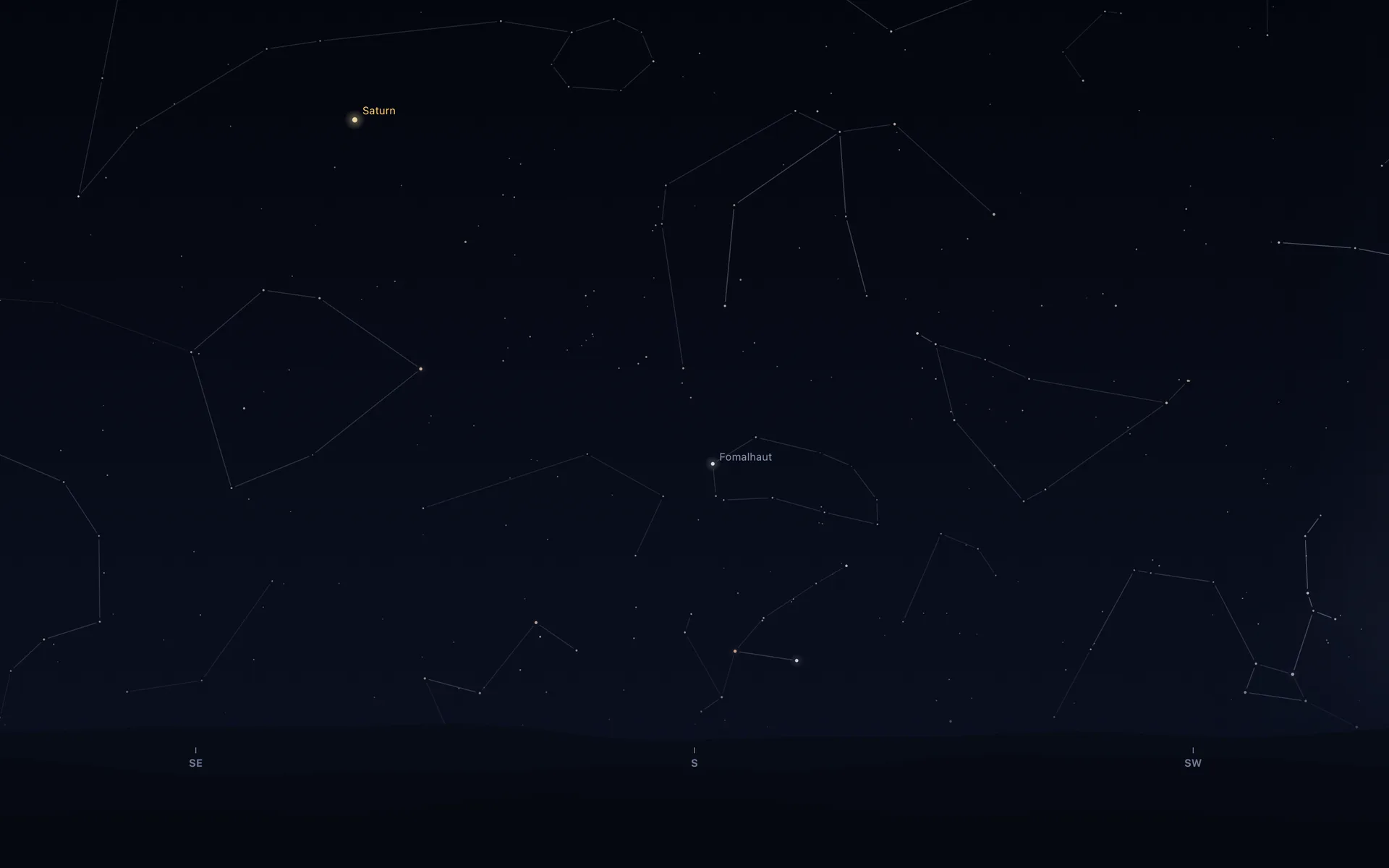
During a visible pass the space station crosses the desktop on time, from the second it rises to the second it sets, while the desktop is in view (a very high pass leaves by the top of the screen). The menu bar shows the Moon in tonight's phase; click it for a briefing on the Sun, Moon, planets, next pass, next launch and aurora chances. The ISS alerts guide covers the optional alert five minutes before a pass.
There's no zoom, pan or search, and you can't click a star, since the window ignores the mouse. It can't steer a telescope or wind the clock forward to tomorrow, and it draws no nebulae. Its 2,874 stars are only the brighter naked-eye ones, down to about magnitude 5.5 (bigger numbers are fainter), and your city's light pollution is left out.
It moves at the sky's real pace, too slowly to watch, but it puts things in the right place. The Saturn in the picture sits 50.46° up by Orbit's sums and 50.49° by NASA JPL's Horizons, checked on 20 October 2026 for the same minute over Los Angeles.
On my Mac mini, a Release build idled at 0.04% CPU (averaged over five minutes) and 22 MB of memory; the live wallpaper battery guide has the rest.
What is a good astronomy app for a Mac?
- Stellarium.
- Night Sky, if your Mac has Apple silicon.
- SkySafari 8 Pro as the iPad app, or the old native SkySafari 6 Pro.
- Starry Night Pro 8 or Pro Plus 8 (mind the Intel and Rosetta note), or Stellarium with its plugins.
- Starry Night Web ($29.99 a year) or Stellarium Web (free).
- Install it from your purchased apps on an Apple silicon Mac.
- Stellarium, Starry Night 8, SkySafari 6 Pro or Orbit. Night Sky and the iPad apps won't run.
- Orbit.
Tap a box as you go. Checks reset when you leave this page.
If the last one sounds like you, Orbit is $6.99 once on the Mac App Store (₹699 in India), with no subscription and nothing to buy inside it. It needs macOS 15 or later, runs on Apple silicon and Intel, and the download is 1.4 MB. The Mac page has the screenshots, and living with a real sky wallpaper has more of my stories.
Common questions
Is Stellarium free?
Yes. Stellarium for Mac, Windows and Linux is free and open source, a download from stellarium.org; version 26.3 came out on 28 September 2026. The separate phone app, Stellarium Mobile, is free on iPhone and iPad with a paid Stellarium Plus upgrade, and it is not offered for Mac.
Is Stellarium on the Mac App Store?
No. The desktop program is downloaded from stellarium.org or its GitHub releases page, and a search of the Mac App Store on 20 October 2026 found no Stellarium for Mac. Stellarium Mobile's listing offers iPhone, iPad and Apple Vision only.
Does Stellarium work on an M1 Mac?
Yes. Stellarium's site labels its macOS download as a universal build for macOS 11 or later, so it runs on Apple silicon Macs (M1 and later) and on Intel Macs. It recommends 4 GB of memory and OpenGL 3.3 graphics.
Is the Night Sky app free?
Night Sky is free to download, including its Mac version, which needs macOS 13.3 and an Apple silicon Mac. Extra features come with the Night Sky+ and Night Sky+ Aura subscriptions; on the US App Store, Aura costs $9.99 a week, $17.99 a month or $69.99 a year.
Is SkySafari available for Mac?
Partly. SkySafari 8 Pro ($34.99) and SkySafari 7 Pro ($17.99) run on Apple silicon Macs as their iPad apps, and the 8 Pro listing says it is not verified for macOS. SkySafari 8 Plus and the basic SkySafari aren't offered for the Mac. The last native Mac version, SkySafari 6 Pro ($19.99), is still sold but was last updated in April 2021.
Star Walk 2 vs Stellarium: which is better on a Mac?
For depth, Stellarium: it's free, runs on Apple silicon and Intel Macs, and its optional catalogues hold more than 220 million stars. Star Walk 2 is a phone-first star map; on a Mac it's the iPad app, so it needs an M1 or later. Star Walk 2 Plus is free with ads ($8.99 removes them), and Star Walk 2 Pro is $2.99.
Is Orbit a planetarium app?
No. Orbit for Mac draws the real sky over your city as your desktop wallpaper and keeps tonight's briefing in the menu bar, but it has no zoom, pan or search, and you can't click on the sky. To look things up, use Stellarium or one of the other apps here alongside it.
More guides
- How to get a live wallpaper on a Mac: what moves, and what it costsHow to get a live wallpaper on a Mac, free or paid: Apple's aerials, video apps, Plash for GIFs and the real sky over your city, with what each one costs.
- How to get ISS pass alerts on a Mac, now that NASA's space station emails are goneNASA stopped Spot the Station's email and text alerts on 12 June 2025. Here's how to get ISS pass alerts now, on your phone or right on your Mac's desktop.
- How to put the Moon phase in your Mac menu bar (or a widget)Six apps put the Moon phase in a Mac or MacBook menu bar, from free to $6.99. Also: how to add a Moon widget, what Weather shows, and 2026's full moons.
- Living with the real night sky as my Mac wallpaperMy Mac's wallpaper is the real night sky over the city I pick, redrawn every minute. What living with it is like, and why Bengaluru sees more sky than LA.
- A live sky wallpaper for Mac that follows your citySee Orbit's Mac sky wallpaper in action: choose a city, preview an ISS pass, open the menu bar briefing and understand what the desktop does between updates.
- A quick tour of Orbit on Android, and where to go after itWatch Orbit's real Android demo, then learn where to find the ISS, explore planets in 3D, move through time and check a rocket launch before heading outside.
- Does live wallpaper drain battery on a MacBook?A video wallpaper works on every frame it plays. Mine draws one picture of the sky a minute. Measured CPU and memory, and how to check any app yourself.
- Dynamic wallpaper not changing on your Mac? 8 things to check, in orderMac dynamic wallpaper not changing or moving? Set the menu to Dynamic, then check Location Services, your time zone and Appearance, on Tahoe and macOS 27.
- Earliest sunset of the year 2026, and why it comes before the shortest dayEarliest sunset of the year 2026: 4:28 PM on 7 December in New York, 3:51 PM on 12 December in London, and why it falls before the year's shortest day.
- Free night sky wallpapers for Mac: eight 5K skies, from Orion to a supermoonFree night sky wallpapers for Mac and MacBook in 5K, each a real sky on a real date: Orion over New York, a supermoon, the Southern Cross and the ISS.
- Geminids 2026: the best night to watch, and when the Moon sets in 13 citiesThe Geminids peak on 14 December 2026 at 14:00 UT (7:30 PM in India) under a crescent Moon that sets early. The best night and moonset times for 13 cities.
- How do I know if I saw the ISS? Eight signs, and how to look up the passHow to know if you saw the ISS: a steady light, no blinking, a few minutes to cross. How to look up the pass, and rule out planes, Starlink and Tiangong.
- How my first Mac app got through App Review, Guideline 2.1 letter and allApple sent my first Mac app a Guideline 2.1 Information Needed letter. I answered the same day with a screen recording; it was approved five days later.
- How my Mac live wallpaper idles at 0.04% CPUMy live wallpaper idles at 0.04% CPU on a Mac. How it draws one picture of the sky a minute, stops when you can't see it, and what ate its memory instead.
- How to find Orion and its belt, with times for 13 citiesHow to find Orion: its belt is three stars in a short, straight row, low in the east on November evenings. Times for 13 cities, and why Australia flips it.
- How to find the North Star, and how high Polaris sits over your cityFind the North Star from the Big Dipper or Cassiopeia's W. It stands about as high as your latitude: 52° in London, 41° in New York, 13° in Bengaluru.
- How to get a live wallpaper on a MacBook Neo without eating its 8 GBYes, a MacBook Neo can run a live wallpaper. Which kinds go easy on its 8 GB, the free ones Apple ships, the 2408 by 1506 size, and what my app weighs.
- How to see the ISS from India: when, which way to face and how high to lookThe ISS shows up over India in short runs at dawn and dusk. How to get the times for your city, which way to face, how high to look and why cities differ.
- Is the ISS coming down? Yes, on purpose, after it retires in 2030Yes, the ISS is coming down, on purpose: NASA plans to retire it in 2030 and sink it in the South Pacific. Why it can't stay up, and how to see it first.
- Leonid meteor shower 2026: the best night and hours to watch, city by cityThe Leonid meteor shower peaks on 17 to 18 November 2026. The half Moon sets near midnight, so the hours before dawn are dark. Best times for 10 cities.
- Mac apps without a subscription: 14 you can buy onceMac apps without a subscription: 14 you can buy once in 2026, from Magnet at $4.99 to BBEdit at $59.99, with update terms where the seller states them.
- Mars and Jupiter conjunction, November 2026: what time to look in your cityMars and Jupiter conjunction: 1.2 degrees apart before dawn, 15 and 16 November 2026. Times for New York, London, Bengaluru and Sydney, and which is which.
- Quadrantid meteor shower 2027: when to look in 16 cities, India includedThe Quadrantids peak on 4 January 2027 at 03:25 UT, for only a few hours, under a thin crescent Moon. When and where to look in 16 cities, India included.
- Supermoons in November and December 2026: the Beaver Moon and the Cold MoonTwo supermoons end 2026: the Beaver Moon on 24 November and the Cold Moon on 23 to 24 December, the year's closest full Moon. Moonrise times for 8 cities.
- What is the bright star in the east before sunrise? Late 2026, date by dateThe bright star in the east before sunrise is Jupiter, then Venus from early November 2026. Where to look and how high, for New York, London and Bengaluru.
- Why the ISS is only visible at dawn and duskWe wrote the code that decides when the ISS is visible. The three tests it runs, the geometry of Earth's shadow, and 30 days of real passes over Bengaluru.