
How to put the Moon phase in your Mac menu bar (or a widget)
Six apps put the Moon phase in a Mac or MacBook menu bar, from free to $6.99. Also: how to add a Moon widget, what Weather shows, and 2026's full moons.
The easiest way to keep the Moon phase in view on a Mac or MacBook is a Moon in the menu bar, where no window can cover it. My app Orbit draws one there in tonight's phase, and hovering over it shows the percent lit. Moon by National Spork ($0.99) and Tiny Moon (free) put the phase up there too. If you'd rather have a desktop widget, you need an app that makes one (Moon Lunation, free to download, says it has them). To install nothing at all, open Apple's Weather app, which shows the phase.
On 20 October 2026, the day this went up, the Moon was a waxing gibbous, more than half lit and growing. By Orbit's engine it was 68% lit at 8 PM here in Bengaluru and 72% at 8 PM in New York. It turns full on the night of 25 to 26 October, the Hunter's Moon.
Orbit's Moon in the Mac menu bar
Orbit puts a small Moon in the menu bar in its current phase, black or white to match light or dark mode. Hover over it for the phase and the percent ("Orbit · Waxing gibbous, 72% lit" at 8 PM in New York on 20 October). The Dock icon is the same Moon.
Click either one for the briefing card. Its Moon tile gives the percent in large type, a drawing of the Moon as it looks right now, the phase name and where it is: "Up now · 34° S", "Up later tonight" or "Down tonight".
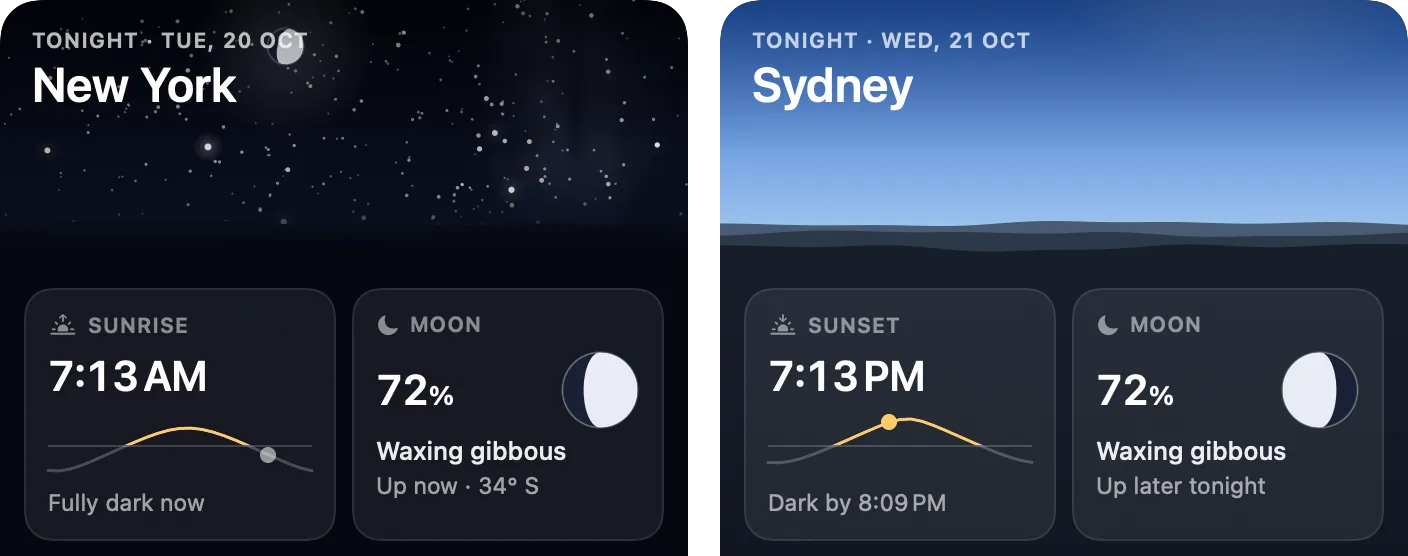
Your city decides only whether the Moon is up and which side looks lit. Right-click the Moon, pick Sydney under Location, and with the sky on the desktop (the default) every Moon Orbit draws turns over. In the same menu, untick Next Event in the Menu Bar to hide the label beside the Moon, such as "ISS 7:24 PM" before a visible ISS pass or "Launch in 5h 12m".
The first menu bar Moon I built, on 27 September, was full at every phase, because a see-through fill painted over a solid one stays solid. My build log let me off lightly with "nobody saw it because the Moon was full that night." Four days later I rewrote the icon. Now the dark part is drawn at 28% opacity, faint but there, so even a thin crescent still reads as a whole Moon.
Orbit 1.0's Moon has no rise or set times, no calendar of coming full moons, no age or distance and no full-moon alert.
Other Moon phase apps for the Mac menu bar (checked October 2026)
There are more of these than Google lets on; the old MoonMenu pages it serves up are from 2012 and earlier.
| App | Maker | Price | What the listing offers | Needs |
|---|---|---|---|---|
| Moon | National Spork | $0.99 | The Moon in the menu bar, the Dock or both, with its age in days or percent lit beside it; rise and set times, upcoming phases, 64,000 cities | macOS 11.5 |
| Tiny Moon | Manuel Lopez | Free | The phase as an emoji in the menu bar, a detail view for any date, offline, no ads; last updated July 2024 | macOS 13 |
| Moonbar | Kyoo Han Bae | $0.99 | The phase as an emoji; click for percent lit, distance, age, moonrise and moonset, next full and new moon; no location prompt | macOS 14.6 |
| Lunette: Moon Phase & Sun | Khang Nguyen | $2.99, one purchase for iPhone, iPad and Mac | Tonight's Moon in the menu bar with sunrise, sunset, golden hour, visible eclipses and full moon alerts | macOS 14 |
| Moon Lunation | TraLand.com | Free; Pro $1.99 once | A native Mac app with a sidebar, a menu bar Moon and desktop widgets | macOS 14 |
| Orbit: Live Sky Desktop | Mad Max Labs (me) | $6.99 once | The Moon in its current phase in the menu bar and Dock, the percent in the tooltip and card, and the live sky on the desktop | macOS 15 |
A few other Moon apps on the store, Deluxe Moon HD and Moon Phase Gadget among them, need macOS 26 or later; everything in the table runs on macOS 15 Sequoia. For full planetarium apps, see the best astronomy apps for Mac.
How to add a Moon phase widget on a Mac or MacBook
Widgets have lived on the Mac desktop since macOS Sonoma (macOS 14, from 2023). To add one, Control-click the wallpaper, choose Edit Widgets, find the app, drag a widget into place and click Done (Apple's steps). Widgets from your iPhone's apps can appear too, if the iPhone runs iOS 17 or later, uses the same Apple Account and is nearby or on the same Wi-Fi.
You still need an app that makes a Moon widget. Of the Mac listings I checked, Moon Lunation is the one that says so outright, and it's free to download. Orbit 1.0 has no widget; its Moon lives in the menu bar and the Dock.
Does the Mac Weather app show the Moon phase?
Yes, once you open it. Apple's Weather guide for Mac says the app shows the current phase and when the next full moon is, and clicking the Moon detail opens an interactive timeline. It won't keep the Moon in view, though. Weather's menu bar item (macOS 15.2 or later) shows the current conditions and temperature, not the Moon.
I owe that app a small debt. Orbit's card was rebuilt twice on 5 October. I called the original, a grey system table, "so old fashioned and serious. Not the Fun Orbit that I made". The second rebuild was modelled on Weather's own cards, with the sky across the top, and my verdict was "wow".
For the whole year's phases at once, use a website. timeanddate's Moon phases page lists them in your city's time, and NASA's Moon Phase and Libration, 2026 shows the Moon hour by hour, with a south-up version for the southern hemisphere.
Why the Moon's phase changes, and what "percent lit" means
Half of the Moon is always in sunlight. What changes is how much of that lit half faces us as the Moon goes round the Earth, once every 29.5 days or so.
There are eight named phases: new moon, waxing crescent, first quarter, waxing gibbous, full moon, waning gibbous, last quarter and waning crescent. "Percent lit" is the share of the face we see that's in sunlight. The names trip people up here. At first quarter the Moon is 50% lit, because "quarter" means a quarter of the way round the cycle, not a quarter of the disc.
A Moon at 13% is a thin crescent.
The percent doesn't climb evenly. Orbit's numbers for 5:30 AM India time each day give 53% on 19 October and 63% on the 20th, up 10 points in a day, but 94% on the 24th and 98% on the 25th, up only 4. Near full it crawls, and it reads 100% for about a day from 9:19 PM India time on 25 October. (Computed with Orbit 1.0 on 20 October 2026.)
At any moment the phase is the same everywhere, but the two hemispheres see the Moon upside down compared with each other, which is why the Moons on the two cards above are lit on opposite sides. The date of a full moon does move with your time zone: the Hunter's Moon is full on the evening of 25 October in California and the morning of 26 October in India.
Full moons and new moons left in 2026 (with the supermoons)
| Phase | Name | UTC | US Eastern | India (IST) | Supermoon? |
|---|---|---|---|---|---|
| Full | Hunter's Moon | 26 Oct, 04:12 | 26 Oct, 12:12 AM (the night of the 25th) | 26 Oct, 9:42 AM | No |
| New | 9 Nov, 07:02 | 9 Nov, 2:02 AM | 9 Nov, 12:32 PM | ||
| Full | Beaver Moon | 24 Nov, 14:53 | 24 Nov, 9:53 AM | 24 Nov, 8:23 PM | Yes, by the usual rule (about 360,768 km) |
| New | 9 Dec, 00:52 | 8 Dec, 7:52 PM | 9 Dec, 6:22 AM | ||
| Full | Cold Moon | 24 Dec, 01:28 | 23 Dec, 8:28 PM | 24 Dec, 6:58 AM | Yes, the closest full moon of 2026 (about 356,740 km) |
Names are the Old Farmer's Almanac's and times are NASA's.
"Supermoon" isn't an official term. The Moon's orbit is a slightly squashed circle, so its distance changes through the month, and NASA's JPL says the word usually means a full moon that falls near the close end of that range. By that rule 24 November and 24 December qualify and 26 October doesn't, which matches BBC Sky at Night's list; timeanddate's stricter cut-off, closer than 360,000 km, counts only December.
Don't expect a giant, though. Sky at Night says the difference from neighbouring full moons is too small for the eye to see.
Orbit's desktop sky draws the Moon too. Switch on Labels on the Sky (it's off by default) and the percent sits beside it, like on this Hunter's Moon.
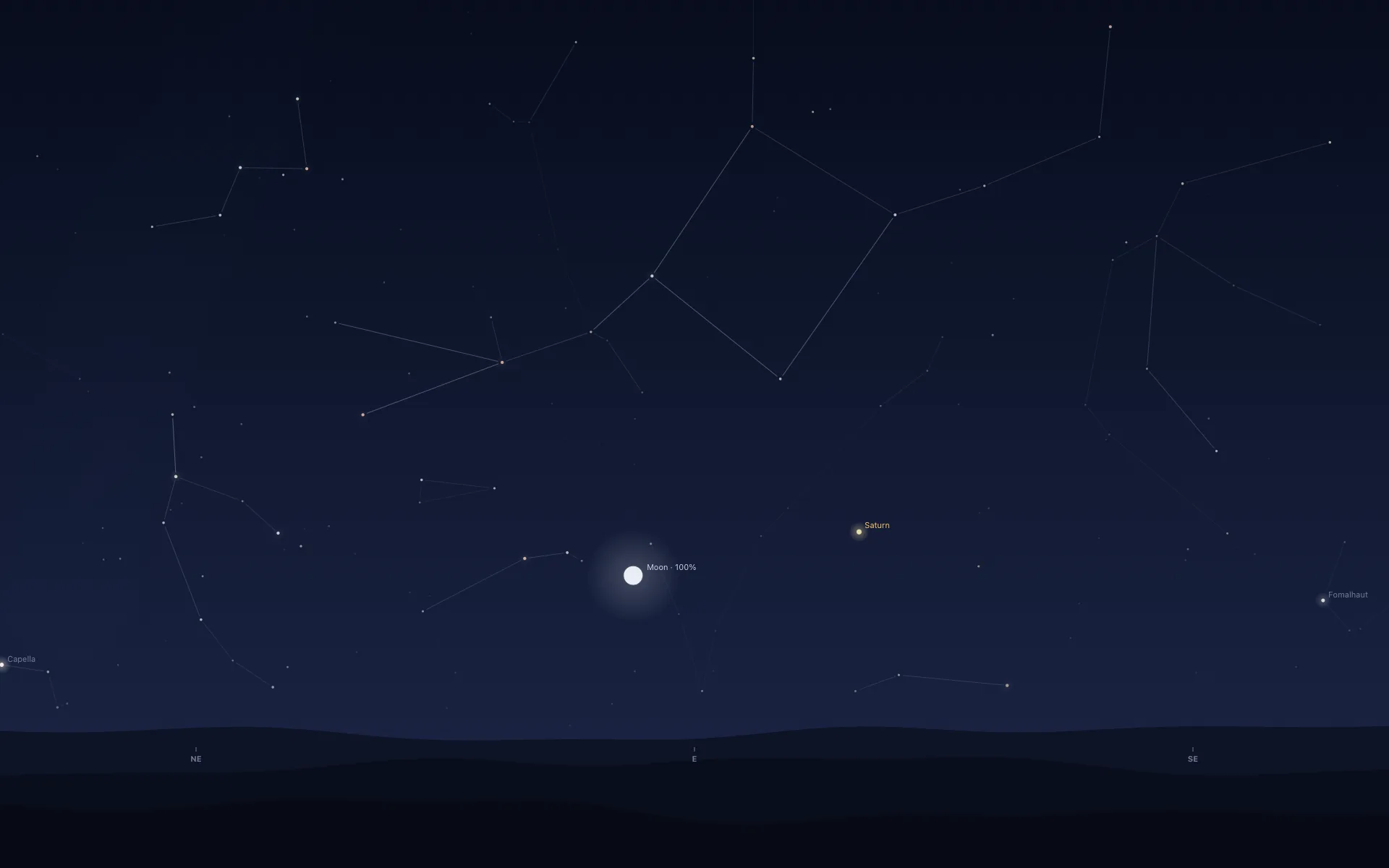
The Moon also decides how good the next big nights are. For the Leonids on the nights of 16 to 17 and 17 to 18 November, the half-lit Moon sets by about midnight and leaves the hours before dawn dark. For the Geminids on 13 to 14 December, a thin crescent sets between about 8 and 10 PM in northern cities. And before dawn on 2 and 30 November it passes close to Mars and Jupiter.
Which Moon app should you use on a Mac?
For a Moon and nothing else, Moon by National Spork ($0.99) knows more Moon facts than mine does, rise and set times included.
Orbit makes sense if you want the sky as well as the Moon. The desktop behind your windows becomes the real sky over your city, and the Moon in the menu bar opens a card that says whether it's up and where (what living with that is like). It's light enough to leave running: idle on my Mac mini (Apple M6, macOS 27) with the sky on the desktop, it averaged 0.04% of the CPU over five minutes and held 22 MB of memory, 33 MB with the card open (more in does live wallpaper drain battery on a MacBook?). It's $6.99 once on the Mac App Store, with no subscription and no account, for macOS 15 or later on Apple silicon and Intel; the screenshots are on the Mac page.
Common questions
Is the Moon phase the same everywhere?
Yes. At any moment the whole Earth sees the same phase, and the percent lit differs by a point at most. From the southern hemisphere the Moon looks upside down compared with the north, so a waxing Moon is lit on the left, and Orbit's Moon flips when you pick a southern city. The date of a full moon can differ by time zone: the Hunter's Moon is full at 9:12 PM on 25 October 2026 in California but 9:42 AM on 26 October in India.
How do I add a Moon phase widget on my Mac?
On macOS Sonoma (macOS 14) or later, Control-click the wallpaper, choose Edit Widgets and add a Moon widget from an app that makes one; Moon Lunation's Mac listing promises desktop widgets. iPhone widgets also work on the Mac if the iPhone runs iOS 17 or later, uses the same Apple Account and is nearby or on the same Wi-Fi. Orbit has no widget; its Moon sits in the menu bar and the Dock.
Does the Mac Weather app show the Moon phase?
Yes, inside the app. Apple's guide says it shows the current phase and when the next full moon is, with an interactive timeline behind the Moon detail. Its menu bar item (macOS 15.2 or later) shows the current conditions and temperature, not the Moon, so for a Moon that stays in view you need a menu bar app.
What does percent lit mean for the Moon?
It is the share of the Moon's visible face that is in sunlight: 0% at new moon, 50% at first and last quarter, 100% at full. It moves about ten points a day near the quarters and only two to four a day near full. Orbit's engine shows 100% for about a day around the Hunter's Moon of 26 October 2026.
How many Moon phases are there?
Eight named ones: new moon, waxing crescent, first quarter, waxing gibbous, full moon, waning gibbous, last (or third) quarter and waning crescent, in a cycle of about 29.5 days. Each name covers a day or more, while the lit share never stops changing, which is why Orbit shows a percent next to the name.
Is the Beaver Moon on 24 November 2026 a supermoon?
Yes, by the usual definition (a full moon when the Moon is near its closest to Earth): it is about 360,768 km away, and the Old Farmer's Almanac and BBC Sky at Night both list it. timeanddate draws the line at 360,000 km, so it counts only the Cold Moon of 24 December, 2026's closest full moon at about 356,740 km. The Hunter's Moon on 26 October is not one.
More guides
- The best astronomy apps for Mac in 2026, and which ones are iPad appsThe best astronomy apps for Mac in October 2026: Stellarium, Night Sky, SkySafari, Starry Night 8 and more, with US prices and which ones are iPad apps.
- How to get a live wallpaper on a Mac: what moves, and what it costsHow to get a live wallpaper on a Mac, free or paid: Apple's aerials, video apps, Plash for GIFs and the real sky over your city, with what each one costs.
- Leonid meteor shower 2026: the best night and hours to watch, city by cityThe Leonid meteor shower peaks on 17 to 18 November 2026. The half Moon sets near midnight, so the hours before dawn are dark. Best times for 10 cities.
- A live sky wallpaper for Mac that follows your citySee Orbit's Mac sky wallpaper in action: choose a city, preview an ISS pass, open the menu bar briefing and understand what the desktop does between updates.
- A quick tour of Orbit on Android, and where to go after itWatch Orbit's real Android demo, then learn where to find the ISS, explore planets in 3D, move through time and check a rocket launch before heading outside.
- Does live wallpaper drain battery on a MacBook?A video wallpaper works on every frame it plays. Mine draws one picture of the sky a minute. Measured CPU and memory, and how to check any app yourself.
- Dynamic wallpaper not changing on your Mac? 8 things to check, in orderMac dynamic wallpaper not changing or moving? Set the menu to Dynamic, then check Location Services, your time zone and Appearance, on Tahoe and macOS 27.
- Earliest sunset of the year 2026, and why it comes before the shortest dayEarliest sunset of the year 2026: 4:28 PM on 7 December in New York, 3:51 PM on 12 December in London, and why it falls before the year's shortest day.
- Free night sky wallpapers for Mac: eight 5K skies, from Orion to a supermoonFree night sky wallpapers for Mac and MacBook in 5K, each a real sky on a real date: Orion over New York, a supermoon, the Southern Cross and the ISS.
- Geminids 2026: the best night to watch, and when the Moon sets in 13 citiesThe Geminids peak on 14 December 2026 at 14:00 UT (7:30 PM in India) under a crescent Moon that sets early. The best night and moonset times for 13 cities.
- How do I know if I saw the ISS? Eight signs, and how to look up the passHow to know if you saw the ISS: a steady light, no blinking, a few minutes to cross. How to look up the pass, and rule out planes, Starlink and Tiangong.
- How my first Mac app got through App Review, Guideline 2.1 letter and allApple sent my first Mac app a Guideline 2.1 Information Needed letter. I answered the same day with a screen recording; it was approved five days later.
- How my Mac live wallpaper idles at 0.04% CPUMy live wallpaper idles at 0.04% CPU on a Mac. How it draws one picture of the sky a minute, stops when you can't see it, and what ate its memory instead.
- How to find Orion and its belt, with times for 13 citiesHow to find Orion: its belt is three stars in a short, straight row, low in the east on November evenings. Times for 13 cities, and why Australia flips it.
- How to find the North Star, and how high Polaris sits over your cityFind the North Star from the Big Dipper or Cassiopeia's W. It stands about as high as your latitude: 52° in London, 41° in New York, 13° in Bengaluru.
- How to get a live wallpaper on a MacBook Neo without eating its 8 GBYes, a MacBook Neo can run a live wallpaper. Which kinds go easy on its 8 GB, the free ones Apple ships, the 2408 by 1506 size, and what my app weighs.
- How to get ISS pass alerts on a Mac, now that NASA's space station emails are goneNASA stopped Spot the Station's email and text alerts on 12 June 2025. Here's how to get ISS pass alerts now, on your phone or right on your Mac's desktop.
- How to see the ISS from India: when, which way to face and how high to lookThe ISS shows up over India in short runs at dawn and dusk. How to get the times for your city, which way to face, how high to look and why cities differ.
- Is the ISS coming down? Yes, on purpose, after it retires in 2030Yes, the ISS is coming down, on purpose: NASA plans to retire it in 2030 and sink it in the South Pacific. Why it can't stay up, and how to see it first.
- Living with the real night sky as my Mac wallpaperMy Mac's wallpaper is the real night sky over the city I pick, redrawn every minute. What living with it is like, and why Bengaluru sees more sky than LA.
- Mac apps without a subscription: 14 you can buy onceMac apps without a subscription: 14 you can buy once in 2026, from Magnet at $4.99 to BBEdit at $59.99, with update terms where the seller states them.
- Mars and Jupiter conjunction, November 2026: what time to look in your cityMars and Jupiter conjunction: 1.2 degrees apart before dawn, 15 and 16 November 2026. Times for New York, London, Bengaluru and Sydney, and which is which.
- Quadrantid meteor shower 2027: when to look in 16 cities, India includedThe Quadrantids peak on 4 January 2027 at 03:25 UT, for only a few hours, under a thin crescent Moon. When and where to look in 16 cities, India included.
- Supermoons in November and December 2026: the Beaver Moon and the Cold MoonTwo supermoons end 2026: the Beaver Moon on 24 November and the Cold Moon on 23 to 24 December, the year's closest full Moon. Moonrise times for 8 cities.
- What is the bright star in the east before sunrise? Late 2026, date by dateThe bright star in the east before sunrise is Jupiter, then Venus from early November 2026. Where to look and how high, for New York, London and Bengaluru.
- Why the ISS is only visible at dawn and duskWe wrote the code that decides when the ISS is visible. The three tests it runs, the geometry of Earth's shadow, and 30 days of real passes over Bengaluru.