
How my Mac live wallpaper idles at 0.04% CPU
My live wallpaper idles at 0.04% CPU on a Mac. How it draws one picture of the sky a minute, stops when you can't see it, and what ate its memory instead.
On my M6 Mac mini, Orbit, the live sky wallpaper I make, averaged 0.04% of one CPU core over five idle minutes with the desktop in view, in the optimised (Release) build, and held 22 MB of memory. Mostly it gets there by doing nothing on purpose: one still picture of the sky a minute, drawn off the main thread, and nothing at all while nobody can see the desktop. The one thing that moves, the space station during a pass, is handed to Core Animation in one go, so the app sleeps while it crosses.
Orbit: Live Sky Desktop is my first Mac app. The measuring scripts and memory hunts below happened in my Claude Code sessions (Claude is co-author on every commit in the repo); I set the condition at the start and make the calls on looks, from rendered pictures. Every measurement comes from one machine, an Apple M6 Mac mini on macOS 27.0 driving one 1920 x 1080 display at 1x. It has no battery, so for battery life and an Activity Monitor checklist for any wallpaper, see does live wallpaper drain battery on a MacBook.
On 27 September I said build it, on one condition: it must never slow my Mac down, because I work on other projects on it all day. 22 MB turned out to be about a fifteenth of one percent of my Mac mini's 32 GB. Here are the limits I set, against what I measured:
| The limit | What I measured |
|---|---|
| Under 1% CPU when idle | 0.04% over 5 minutes, optimised build (0.60% in the busiest 5 seconds) |
| Under 60 MB of memory | 22 MB idle; 33 MB with the briefing card open, 38 MB the highest seen |
| Animation only when something real moves, 30 frames a second at most | only the station during a pass; it asks for 30, and the app can't read the real rate |
| A full stop when the desktop is hidden | 0.00% CPU and 19 MB, tested behind the lock screen |
| No GPU work when idle | not measured yet |
How do live wallpapers work on a Mac?
With a window, because macOS has no live-wallpaper API. The one official call, setDesktopImageURL(_:for:options:), sets the wallpaper to an image file, and nothing in it plays.
So the usual way, and Orbit's, is a borderless window (one with no title bar or edges) over each display. Orbit's sits one level below the level Apple gives desktop icons, so the icons stay on top and the menu bar and Dock sit far above. A few lines in DesktopWindow.swift do most of the rest:
collectionBehavior = [.canJoinAllSpaces, .stationary, .ignoresCycle, .fullScreenNone]
ignoresMouseEvents = true
colorSpace = .sRGB
canJoinAllSpaces puts the window on every Space, like the menu bar. stationary keeps it put when Mission Control shuffles everything else. ignoresMouseEvents lets clicks pass straight through to the desktop beneath, as if Orbit weren't there. ignoresCycle keeps it out of Command-backtick window switching, and fullScreenNone means it can't be made full screen.
The window can never become the key window (the one your typing goes to), and it stays off screen until its first picture is ready, so the desktop never flashes an empty sky.
Quit Orbit and your own wallpaper is back. To set one up rather than build one, see how to get a live wallpaper on a Mac.
How often does a live wallpaper need to redraw?
For a sky, once a minute. On Orbit's 120-degree view the sky creeps about 4 pixels a minute across a 1080p screen (two pictures an hour apart show it), so more redraws would buy nothing you could see. At that pace you notice the sky has moved by looking up after an hour, not by watching.
There is one clock in the whole app, MinuteClock, and its only repeating timer fires a second after each whole minute:
let timer = Timer(fire: Date(timeIntervalSinceReferenceDate: nextMinute + 1), interval: 60, repeats: true) { [weak self] _ in
    MainActor.assumeIsolated { self?.onTick?() }
}
timer.tolerance = 10
The tolerance lets macOS fire it up to ten seconds late, so the wake-up can ride along with others the system already has planned. Apple's Energy Efficiency Guide for Mac Apps suggests at least 10% of the interval for a repeating timer, and ten seconds in sixty is about 17%. The only other ticks are one-offs, for the second a pass begins or ends and the end of a pass preview.
- Up to ten seconds late, by design.
- Each window carries a stamp, the minute plus a counter that goes up when a setting changes. Only windows that are out of date (a new minute, a changed setting or display, a pass starting or ending) and can be seen get redrawn.
- Off the main thread, at low priority (higher when you've just changed a setting), into one CoreGraphics bitmap in sRGB per display.
- The main thread sets it as the layer's
contentswith animations off, so nothing crossfades, then does nothing until next time.
Tap a box as you go. Checks reset when you leave this page.
A 1080p sky takes 7 to 8 ms at full priority in the optimised build. Orbit asks for the low "utility" priority, though, so its drawing queues behind your own work. In my Debug builds the same code averaged 18 ms one morning, 29 ms that afternoon and 66 to 117 ms behind the lock screen. Same renderer, file for file; what moves the number is when macOS gets round to low-priority work.
Does a live wallpaper keep running behind full-screen apps?
Orbit is built not to. Each desktop window asks AppKit for its occlusionState, which says whether any part of it can be seen:
var isShowingDesktop: Bool { occlusionState.contains(.visible) }
The same Energy Efficiency Guide is blunt about what to do with it: when none of a window can be seen, "your app should halt all work performed in that window."
That one signal covers a full-screen app's Space, the lock screen, the screen saver and a sleeping display. It also listens for screensDidSleepNotification, and for power-source changes, which IOKit sends through IOPSNotificationCreateRunLoopSource, so nothing polls the battery. On battery below 20%, the clock stops. The 20% isn't a setting.
When any of those hold, the clock throws its timer away. Until the pause ends nothing redraws, and the briefing waits too unless you open the card. Then Orbit draws once. I've only tested the pause behind the lock screen (my Mac mini has no battery for the last case), and there it read 0.00% CPU over 150 seconds and 19 MB.
Moving the ISS with Core Animation keyframes
During a visible pass the space station crosses the desktop as a small layer above the still sky: two tiny images, a white-hot point in a cyan glow and a tapering trail. I haven't watched a live one on my real desktop yet; I've seen passes only in log lines and in captures with the clock faked (for a nudge before a real one, see ISS pass alerts on a Mac). Orbit works out where the station will be each second of the pass and hands the whole list to Core Animation in one go:
keyframes("position", path.points.map { NSValue(point: $0) }, on: layer)
keyframes("transform.rotation.z", path.headings, on: layer)
keyframes("opacity", path.brightness, on: layer)
keyframes("transform.scale.x", path.trails.map { max(0.001, $0 / Self.trailLength) }, on: trail)
A CAKeyframeAnimation fills in the frames between those values, and WindowServer, the macOS process that puts every window on screen, does the drawing. Orbit's own process isn't woken to move the station, and the sky underneath isn't redrawn for it. I never needed a display link (a callback on every frame) or a per-frame timer. Each animation asks for at most 30 frames a second, though the app has no way to read the rate WindowServer really composites at:
static let frameRate = CAFrameRateRange(minimum: 15, maximum: 30, preferred: 30)
A pass already under way gets a beginTime in the past, so the station starts from wherever it has got to. The sky itself redraws once as a pass begins and once as it ends, turning to face the pass and back again if the direction you picked doesn't already show it.
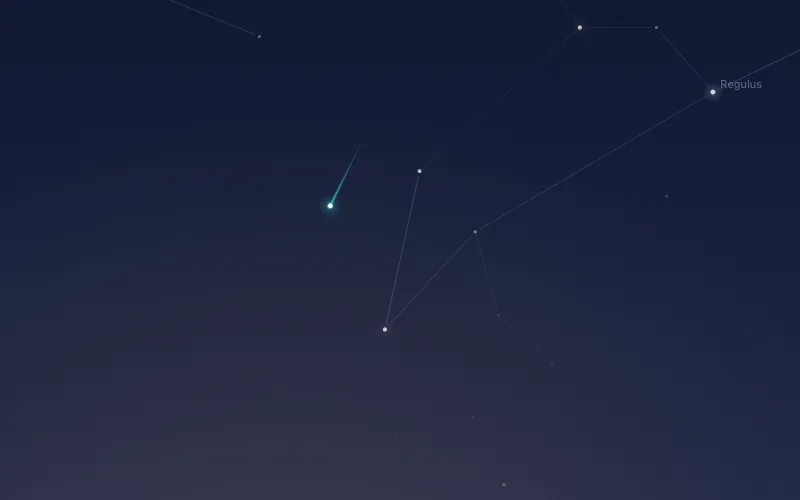
Over a 617-second pass, with the app's clock set forward to the evening, the screen locked and drawing forced on, Orbit read 0.0% CPU in every 5-second sample except the minute's redraw (2.3%), and 22 MB throughout. It kept time to a tenth of a second: 616.9 seconds by the wall clock for a 617-second pass. It was that evening's pass, played behind my lock screen at a quarter to three in the afternoon.
WindowServer was harder to pin down, and my own measuring kit was the problem. The Claude session running the test redrew its window busily enough to hold WindowServer at 41 to 51%, with or without Orbit. Against that, the 12-second pass preview made no step you could see: 47.4% before, 47.7% during, 46.7% after. Whatever the station costs WindowServer is lost in a few points of noise.
How much memory does a live wallpaper need on a Retina or 5K display?
Each display gets a picture sized to its points times its scale, up to 2x, and all the displays together are capped at 10 million pixels (though never below 1x):
static let pixels = 10_000_000.0
A sky picture is four bytes a pixel and stays in memory while it's shown, so the cap is 40 MB. Past it, every display's picture is drawn coarser by the same factor and the layer scales it up.
| Displays | Full-sharpness picture | What Orbit draws | Sky pictures in memory |
|---|---|---|---|
| One 1080p display at 1x | 1920 x 1080 (2.1 million pixels) | the same, at 1x | about 8 MB |
| 14-inch MacBook Pro | 3024 x 1964 (5.9 million) | the same, at 2x | about 24 MB |
| 4K display set to look like 1920 x 1080 | 3840 x 2160 (8.3 million) | the same, at 2x | about 33 MB |
| Studio Display (5K) | 5120 x 2880 (14.7 million) | 4216 x 2372, at 1.65x | 40 MB |
| 14-inch MacBook Pro plus a Studio Display | 20.7 million together | both at 1.39x | 40 MB |
| Two Studio Displays | 29.5 million together | both at 1.16x | 40 MB |
So my 22 MB is the small-screen figure, and I haven't had a Retina or 5K display to measure the whole app on.
How to see what's eating a Mac app's memory (footprint)
Every memory figure here is a reading from footprint, Apple's command-line tool for the memory the system counts against a process. Plain footprint breaks it down by kind, footprint -v lists every memory region, and heap and malloc_history (run with MallocStackLogging=1) say who allocated what.
The colour space that copied every image
The first real sky measured 45 MB, with a 60 MB peak, against 14 MB for the placeholder before it. An opaque pixel format was the first suspect and wasn't the cause. Instead, Core Animation was re-rendering every sky picture into a full-size copy of its own, because the window was in the display's colour space and the picture was in sRGB. ColorSync had built 27 lookup tables of 272 KB each for that and for the Moon icon drawn into AppKit's own contexts. And OrbitKit's cached star catalogue was sitting in memory.
Together the fixes took it from 45 MB down to 19 MB (27 MB peak): the window declared sRGB (that colorSpace line), the icons drawn into sRGB bitmaps, and the catalogue loaded without its cache.
If you're hunting the same thing, a full-size "CoreAnimation" region in footprint, or "CG Raster Data" counted more than once per display, means an image is being copied. Blocks of 272 KB in multiples of three in heap are ColorSync tables.
NSPopover memory usage on macOS 27
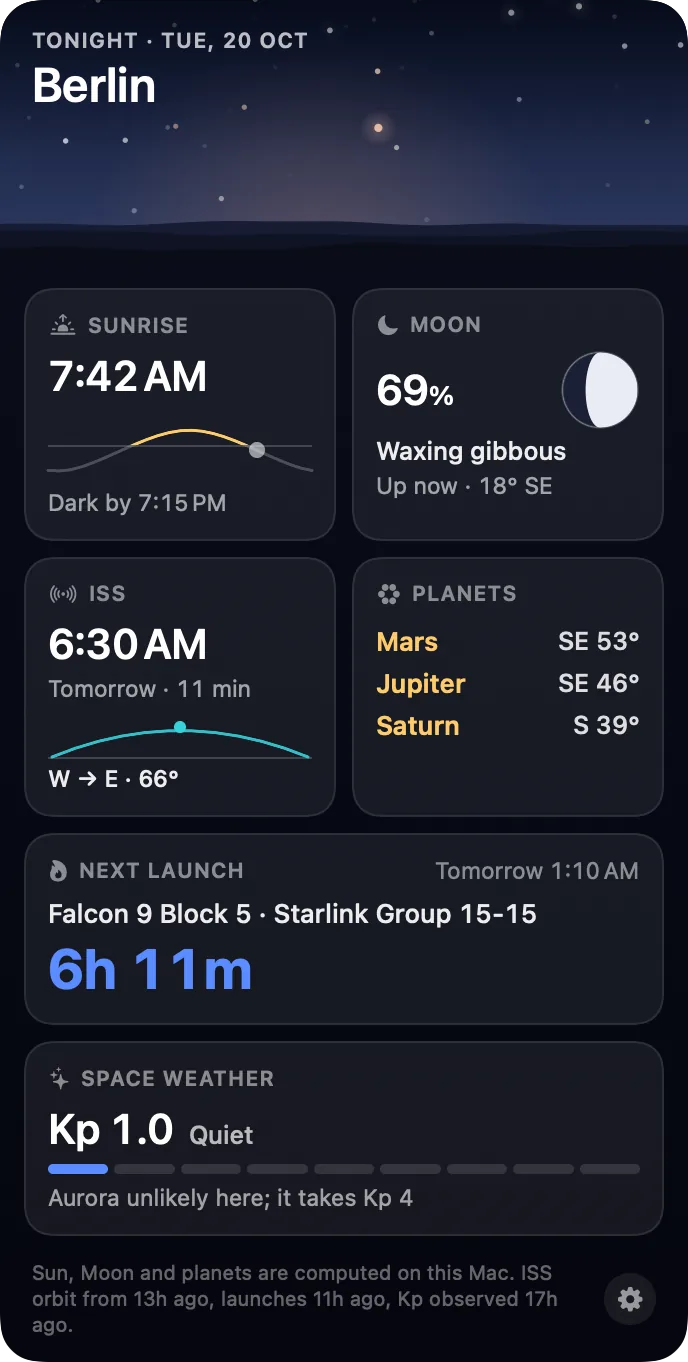
The briefing card under the menu bar Moon first lived in an NSPopover, the standard speech bubble that hangs from a menu bar icon. Every open and every close added about 40 MB of graphics memory at once, and macOS took about fifteen seconds to hand it back.
footprint -v showed the spike as IOSurfaces tagged RenderBox, 420 x 542 in half-float RGBA. That's wider than the 344-point card, so it was the popover's own chrome (its frame and arrow). A popover holding one empty AppKit view and a label spiked just the same. On macOS 27 the popover draws its chrome in the app's process through Metal, and nothing you put inside it changes that.
The fix is CardPanel, a borderless, non-activating NSPanel of Orbit's own, hung under the Moon. The same card sat at 28 MB open, with no spike. A panel has to close itself, though, and my first one had square shadow "ears" poking out of its rounded corners, visible only in a capture of the real window. The before-and-after numbers are in how my first Mac app got through App Review.
SwiftUI Canvas performance: about 45 MB for a few rings
Four days later the redesigned card got faint background rings, drawn in a SwiftUI Canvas. Opening the card took the footprint from 23 MB to 69 MB; the same rings as plain Circle shapes came to 31 MB. The numbers point to a Canvas drawing through the same renderer as the popover's chrome. That's my inference, not anything Apple documents.
To be fair to Apple, its Canvas page pitches it as possibly faster for a complex drawing with dynamic data. For a few rings in a card that opens and closes all day, it cost me memory instead. The popover put a rule in the project's notes: nothing that draws through Metal inside Orbit (Metal itself, a display link, an NSPopover, a glass effect) goes in without being measured first. The rings put the Canvas on that list.
What I haven't measured yet
The GPU, for a start. powermetrics needs sudo, the measuring ran in Claude Code sessions that don't use it, and I haven't run it myself yet. Neither the still sky nor the pass needed Metal, but WindowServer putting them on screen is GPU work Orbit can't see from inside. I also owe a WindowServer reading from a quiet desktop.
Then there are the 122 wake-ups. In one five-minute run on 5 October, while I was typing and moving windows, some notification from macOS woke Orbit about every two and a half seconds. CPU stayed at 0.11%, and quiet runs counted 6 or 7 in the same time. Paused, it still counted 3 in 150 seconds. I haven't looked into either yet, but Orbit runs its whole minute check on every occlusion change of any window in the app, so that's where I'll look first.
Getting Orbit
If you'd like a wallpaper that spends almost all of every minute doing nothing, and shows the real sky over your city while it does, that's Orbit: Live Sky Desktop. The space station crosses it during visible passes, and a Moon in the menu bar opens tonight's briefing. It's $6.99 once on the Mac App Store (₹699 in India), with no subscription or in-app purchases, for macOS 15 or later on Apple silicon and Intel. Screenshots are on the Mac page.
Common questions
How do live wallpapers work on a Mac?
macOS only lets an app set the wallpaper to an image file. So the usual way, and Orbit's, is a borderless window of the app's own just below the desktop icons, on every Space, that lets clicks pass straight through to the desktop beneath. Orbit draws one still picture of the sky into that window each minute. Quit it and your own wallpaper is back.
Does a live wallpaper affect FPS in games?
A full-screen game covers the desktop, and a wallpaper that checks for that can stop drawing. Orbit asks macOS whether any part of its desktop windows can be seen, and stops completely, with no timer running, when none can. Paused, it measured 0.00% CPU on my Mac mini. I've tested that pause behind the lock screen, not behind a real full-screen game.
Why is WindowServer using so much CPU?
WindowServer is the part of macOS that puts every window on screen, so its CPU climbs with everything that draws: animations, video, an app redrawing itself. While I measured Orbit, the Claude session running my tests held it at 41 to 51% with or without Orbit, and Orbit's pass preview added no visible step. To find your culprit, open Activity Monitor and quit apps one at a time until it drops.
How do I check an app's memory usage on a Mac?
Open Activity Monitor and look at the Memory tab. Developers can run footprint in Terminal with the app's name or process ID. It reports the memory the system counts against the app, broken down by kind, and footprint -v lists every memory region. Every memory figure I give for Orbit is a footprint reading.
Does SwiftUI Canvas perform better than shapes?
Apple says a Canvas might perform better for a complex drawing with dynamic data. For a few rings in Orbit's card on macOS 27 it cost memory instead: 23 MB to 69 MB as the card opened (77 MB at the peak), against 31 MB with the same rings as plain Circle shapes. Measure your own case before choosing.
More guides
- Does live wallpaper drain battery on a MacBook?A video wallpaper works on every frame it plays. Mine draws one picture of the sky a minute. Measured CPU and memory, and how to check any app yourself.
- How my first Mac app got through App Review, Guideline 2.1 letter and allApple sent my first Mac app a Guideline 2.1 Information Needed letter. I answered the same day with a screen recording; it was approved five days later.
- How to get a live wallpaper on a Mac: what moves, and what it costsHow to get a live wallpaper on a Mac, free or paid: Apple's aerials, video apps, Plash for GIFs and the real sky over your city, with what each one costs.
- How to get ISS pass alerts on a Mac, now that NASA's space station emails are goneNASA stopped Spot the Station's email and text alerts on 12 June 2025. Here's how to get ISS pass alerts now, on your phone or right on your Mac's desktop.
- A live sky wallpaper for Mac that follows your citySee Orbit's Mac sky wallpaper in action: choose a city, preview an ISS pass, open the menu bar briefing and understand what the desktop does between updates.
- A quick tour of Orbit on Android, and where to go after itWatch Orbit's real Android demo, then learn where to find the ISS, explore planets in 3D, move through time and check a rocket launch before heading outside.
- Dynamic wallpaper not changing on your Mac? 8 things to check, in orderMac dynamic wallpaper not changing or moving? Set the menu to Dynamic, then check Location Services, your time zone and Appearance, on Tahoe and macOS 27.
- Earliest sunset of the year 2026, and why it comes before the shortest dayEarliest sunset of the year 2026: 4:28 PM on 7 December in New York, 3:51 PM on 12 December in London, and why it falls before the year's shortest day.
- Free night sky wallpapers for Mac: eight 5K skies, from Orion to a supermoonFree night sky wallpapers for Mac and MacBook in 5K, each a real sky on a real date: Orion over New York, a supermoon, the Southern Cross and the ISS.
- Geminids 2026: the best night to watch, and when the Moon sets in 13 citiesThe Geminids peak on 14 December 2026 at 14:00 UT (7:30 PM in India) under a crescent Moon that sets early. The best night and moonset times for 13 cities.
- How do I know if I saw the ISS? Eight signs, and how to look up the passHow to know if you saw the ISS: a steady light, no blinking, a few minutes to cross. How to look up the pass, and rule out planes, Starlink and Tiangong.
- How to find Orion and its belt, with times for 13 citiesHow to find Orion: its belt is three stars in a short, straight row, low in the east on November evenings. Times for 13 cities, and why Australia flips it.
- How to find the North Star, and how high Polaris sits over your cityFind the North Star from the Big Dipper or Cassiopeia's W. It stands about as high as your latitude: 52° in London, 41° in New York, 13° in Bengaluru.
- How to get a live wallpaper on a MacBook Neo without eating its 8 GBYes, a MacBook Neo can run a live wallpaper. Which kinds go easy on its 8 GB, the free ones Apple ships, the 2408 by 1506 size, and what my app weighs.
- How to put the Moon phase in your Mac menu bar (or a widget)Six apps put the Moon phase in a Mac or MacBook menu bar, from free to $6.99. Also: how to add a Moon widget, what Weather shows, and 2026's full moons.
- How to see the ISS from India: when, which way to face and how high to lookThe ISS shows up over India in short runs at dawn and dusk. How to get the times for your city, which way to face, how high to look and why cities differ.
- Is the ISS coming down? Yes, on purpose, after it retires in 2030Yes, the ISS is coming down, on purpose: NASA plans to retire it in 2030 and sink it in the South Pacific. Why it can't stay up, and how to see it first.
- Leonid meteor shower 2026: the best night and hours to watch, city by cityThe Leonid meteor shower peaks on 17 to 18 November 2026. The half Moon sets near midnight, so the hours before dawn are dark. Best times for 10 cities.
- Living with the real night sky as my Mac wallpaperMy Mac's wallpaper is the real night sky over the city I pick, redrawn every minute. What living with it is like, and why Bengaluru sees more sky than LA.
- Mac apps without a subscription: 14 you can buy onceMac apps without a subscription: 14 you can buy once in 2026, from Magnet at $4.99 to BBEdit at $59.99, with update terms where the seller states them.
- Mars and Jupiter conjunction, November 2026: what time to look in your cityMars and Jupiter conjunction: 1.2 degrees apart before dawn, 15 and 16 November 2026. Times for New York, London, Bengaluru and Sydney, and which is which.
- Quadrantid meteor shower 2027: when to look in 16 cities, India includedThe Quadrantids peak on 4 January 2027 at 03:25 UT, for only a few hours, under a thin crescent Moon. When and where to look in 16 cities, India included.
- Supermoons in November and December 2026: the Beaver Moon and the Cold MoonTwo supermoons end 2026: the Beaver Moon on 24 November and the Cold Moon on 23 to 24 December, the year's closest full Moon. Moonrise times for 8 cities.
- The best astronomy apps for Mac in 2026, and which ones are iPad appsThe best astronomy apps for Mac in October 2026: Stellarium, Night Sky, SkySafari, Starry Night 8 and more, with US prices and which ones are iPad apps.
- What is the bright star in the east before sunrise? Late 2026, date by dateThe bright star in the east before sunrise is Jupiter, then Venus from early November 2026. Where to look and how high, for New York, London and Bengaluru.
- Why the ISS is only visible at dawn and duskWe wrote the code that decides when the ISS is visible. The three tests it runs, the geometry of Earth's shadow, and 30 days of real passes over Bengaluru.