
How my first Mac app got through App Review, Guideline 2.1 letter and all
Apple sent my first Mac app a Guideline 2.1 Information Needed letter. I answered the same day with a screen recording; it was approved five days later.
The day after I submitted my first Mac app, I came back to my Claude Code session with four words: "Apple rejected the app." It hadn't, quite. App Store Connect did say Rejected, but the reason was Guideline 2.1 (Information Needed, New App Submission): a questionnaire Apple sends some developers whose accounts have little review history. I answered it the same day with a two-minute screen recording and written answers to all six points, resubmitted, and Orbit was approved five days later without another question.
I'm Falcon, a solo developer in Bengaluru. Orbit: Live Sky Desktop is my first Mac app and my first on Apple's store; the free Android version of Orbit came before it. I built it with Claude Code as a pair, and every commit in the repo has Claude as co-author.
Building my first Mac app with Claude Code
On 27 September Claude pulled the Mac App Store's top-paid charts and pitched the real sky as a desktop. I asked what it would show and where the wow was, then said build it, on one condition: it must never slow the Mac down. (Where Orbit itself came from is a longer story, told here.)
The app turns the desktop into the real sky over your city, with a Moon in the menu bar that opens tonight's briefing. The sky is a borderless window behind the desktop icons, since macOS has no live-wallpaper API (how that works). It took nine days to get from that pitch to the upload. On the way, the ground went from a "black bar" to hills, and the briefing card was rebuilt twice before I liked it (that story).
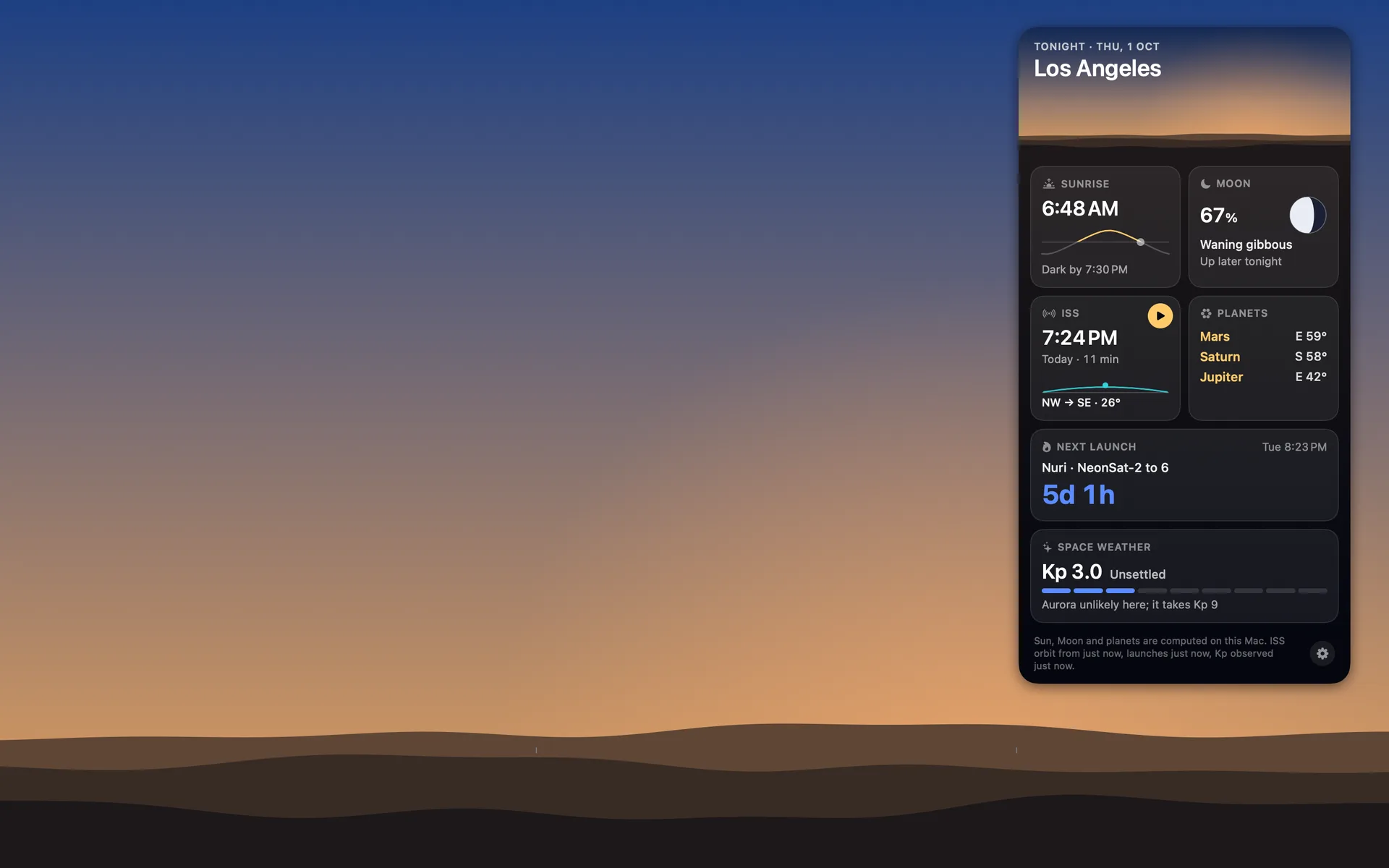
The "never slow the Mac down" rule has numbers: under 1% CPU when idle and under 60 MB of memory, because the app is meant to run all day. The card first lived in an NSPopover, the standard Mac speech bubble. On my Mac mini (macOS 27), every open and every close took about 40 MB of graphics memory for under a second and gave it back over the next fifteen seconds.
A popover holding one empty view did the same. On macOS 27 the popover draws its frame inside the app's process through Metal, Apple's graphics layer, so nothing the card did could change that. In a borderless panel of Orbit's own, the same card sat at 28 MB with no spike. Four days later the card's background rings, drawn in a SwiftUI Canvas, brought the spike back:
| The card in | Memory |
|---|---|
| An NSPopover | 79 to 84 MB at the peak |
| An NSPopover holding one empty view | 78 MB |
| A borderless panel of Orbit's own | 28 MB, no spike |
| Background rings in a SwiftUI Canvas | 69 MB, 77 MB peak |
| The rings as plain Circle shapes | 31 MB |
What the finished app uses, idle and with the card open, is in does a live wallpaper drain your battery.
Two Xcode signing errors before the upload
"unable to build chain to self-signed root"
Xcode made my Apple Development certificate, and then the Mac refused to use it: security find-identity -v -p codesigning reported 0 valid identities, and codesign said "unable to build chain to self-signed root". The Mac had only Apple's old Worldwide Developer Relations intermediate certificate, the one that expired on 7 February 2023.
Newer certificates are signed by the renewed one, listed on Apple's certificate authority page as G3, good until 20 February 2030. Xcode keeps a copy in its own bundle (AppleWWDRCA-2030.cer), and importing it into the login keychain gave one valid identity at once.
"No Account for Team": the wrong Team ID
Then every build, Xcode's own archive included, failed with "No Account for Team" and "no signing certificate with a private key". My certificate's name ends in a 10-character code in brackets, and that code had gone into the project as the Team ID.
It isn't the Team ID. Apple's Team ID is a different code, under Membership details in your developer account. Both are 10 characters long, so nothing looked wrong until Xcode said so. With the real one in, the signed build went through.
Uploading the build and submitting it for review
For a Mac app that needs no provisioning profile in development, like mine, the archive registers nothing with Apple, so the App ID and the app's record in App Store Connect had to exist before the upload. On the listing, the "Sign-in required" box under App Review Information was ticked by default. Orbit has no sign-in, so it came off.
The listing was set to manual release, so the app would go on sale on a day I picked, not the minute Apple approved it.
Until the session before the upload, every build had no icon at all. Three were drawn to choose from, and the first, Orbit's planet with its cyan ring and gold star in the Mac's rounded square, went in as the default.
The export ended with "Uploaded package is processing. Upload succeeded." Build 1.0 (1) was submitted the same day, and it went to Waiting for Review.
Guideline 2.1 Information Needed (New App Submission): what Apple asked
The next day two emails came: "Your App Review Feedback" and "There's an issue with your Orbit: Live Sky Desktop (macOS) submission". Neither said what the issue was. The reason sits on the submission's page in App Store Connect, under App Review, as Apple's App Review page says. App Store Connect marked the submission Rejected, which is where my four words came from.
The heading read Guideline 2.1, Information Needed, New App Submission. The letter said the app came from an account with "limited App Review history" and asked for six things, to be answered in the submission's message thread and copied into the Notes field:
- A screen recording made on a physical device running the latest OS, starting at launch and showing the typical flow.
- What the app is for and who it's for.
- How to set it up and reach the main features.
- Which outside services it uses.
- Any regional differences.
- Whether it's in a regulated industry or uses protected material.
None of that pointed at a fault. Guideline 2.1 itself is about completeness: a final, tested build, with demo login details if the app has a login. It doesn't mention this questionnaire at all. The letter is a form, and the account's short history was the only reason it gave.
Plenty of people get it. On Apple's forums, one developer heard nothing for 12 days after sending all seven items Apple asked for, a screen recording on a physical device among them. Another developer's first iOS app went in on 27 September, was resubmitted on 2 October and was still in Waiting for Review when they posted. Those are two people's stories, not Apple's numbers.
How I answered Guideline 2.1: a screen recording Claude drove
I asked Claude, "can't you drive the thing?", switched on Computer use in the Claude app's settings and gave it Accessibility permission. It clicked through the real app on my Mac mini while macOS's screencapture recorded the screen.
The build under review went into the Applications folder first, so the video opens on a real double-click and the first launch's "Open Orbit at login?" question, answered Not Now. Of the menu's thirteen cities, only Bengaluru and Sydney had a visible ISS pass in the next four days, so the recording went to Bengaluru. The gold play button on the card previewed the pass, and the station crossed the pre-dawn sky on the desktop in twelve seconds. After that came the right-click menu, the pass alerts switch with macOS's notification prompt, and Quit, which put the old wallpaper back.
The first take ran over three minutes. I watched it in QuickTime and said it should start at the launch, and that the end was dead ("just a moon at 13% there, made me sleepy"). The cut started it at the double-click and took out 15 seconds of still day sky after the preview and 47 seconds of looking for the Allow button, leaving 2 minutes 2 seconds at 1920 by 1080.
The first file picked for the attachment was Claude.app.zip. It was cancelled before anything went to Apple, so App Review never received a copy of Claude.
In the Notes field, the written answers came to 3,396 characters of the 4,000 it takes. Boiled down, they said:
- No account, no sign-in, no in-app purchase.
- Three public, read-only feeds: CelesTrak for the station's orbit, The Space Devs' Launch Library 2 for launches, NOAA's Space Weather Prediction Center for the Kp index.
- Everything else is computed on the Mac.
- No regional differences.
- No regulated industry and no protected material.
Then three clicks: Reply to App Review with the video attached, Update Review on the 1.0 page, Resubmit to App Review. The reply has to go first, because Apple's help page says replies can carry attachments until you resubmit. The letter said a reply alone answers an information request; resubmitting also put the item back in the queue with the new notes.
How long does Apple app review take for a Mac app?
Apple's App Review page says it typically reviews at least 50% of submissions in under 24 hours and 90% in under 48 hours. That figure is for all submissions together. Mine was a first app from a new account, and it went like this:
| When | What happened |
|---|---|
| 6 October | Build 1.0 (1) uploaded and submitted. Waiting for Review. |
| 7 October | Guideline 2.1 letter. Recording and answers sent, and resubmitted, within hours. |
| 10 October | Three days of silence. |
| 12 October (US Pacific) | Approved, with nothing questioned. |
| 17 October | Released manually: Ready for Distribution. |
| 18 October | The Mac App Store lists Orbit. |
On 10 October, three days into the silence, I said, "I feel like Apple's gonna reject it on the basis of it being too basic." The guideline for that fear is 4.2, Minimum Functionality, for apps that don't do enough to belong on the store. Apple never raised it.
The plan had been to ask App Review for a status if nothing arrived by 14 October; it never came to that. I didn't ask for an expedited review either, which Apple keeps for "extenuating circumstances" like a critical bug fix. In those forum threads, one developer tried the expedite form and was told "You don't have a submission in review". The other got a request in and was still waiting when they posted.
Pending Developer Release: approved, and then nothing
With manual release, approval puts nothing on sale. The version moves to Pending Developer Release and waits for someone to click Release This Version; Apple's release options page says Apple emails a reminder if a version waits there more than 30 days.
The two approval emails, "Welcome to the App Store" and "Review of your Orbit: Live Sky Desktop (macOS) submission is complete", came five days after the resubmission. On 17 October I opened my next session with "Apple finally approved our app for the Mac-OS", and a Gmail search turned up both mails. Later that day it was "Orbit Launch is a GO". When Claude suggested sending Apple an update before the big launch push, I said no: "I just got the Mac App approved, I can't file for another revision."
The release took two clicks, and they weren't mine. I'd signed in to App Store Connect in Edge, linked Claude in Chrome and asked: "I need you to publish the app for me and show me the steps so I can do it myself next time." Claude clicked Release This Version. A sheet asked "Release macOS app on the App Store in 175 countries or regions?" One more click, and about four seconds later the left column read "1.0 Ready for Distribution".
Apple says a release can take up to 24 hours to show up. Orbit was on the store by 18 October, at $6.99 (₹699 in India). The day after that I was back, "low-key proud", asking which paid Mac app to build next.
What I'd tell anyone shipping a first Mac app
- It's under Membership details on the developer site, not in brackets in your certificate's name.
- If codesign says "unable to build chain to self-signed root", add Apple's current intermediate (G3) to the keychain from Xcode's bundle.
- Create the App ID and the app record first. My archive registered nothing on its own.
- If there's no login, turn it off under App Review Information. Mine was on by default.
- Apple's emails don't say why. The submission's page does.
- Record on a real Mac, start at the launch, cut the dead air and number your answers.
- You choose the launch day. The version waits in Pending Developer Release until someone clicks Release This Version.
- On macOS 27 each cost Orbit about 40 MB or more, in a 60 MB budget.
Tap a box as you go. Checks reset when you leave this page.
Orbit: Live Sky Desktop draws the real sky over your chosen city on your desktop and redraws it once a minute, pausing whenever the desktop is hidden. Tonight's Moon sits in the menu bar with the briefing card under it, and during a visible pass the ISS crosses the desktop. The price is $6.99 once, no subscription, for macOS 15 or later on Apple silicon and Intel.
Here's a pass over New York as Orbit draws it, about seven minutes of sky in under 18 seconds. It's a demonstration from the app's renderer, not a live pass.
The screenshots and the measurements are on the Mac page.
Common questions
How long does Apple app review take?
Apple says it typically reviews at least 50% of submissions in under 24 hours and 90% in under 48 hours. My first Mac app got its first answer the next day, an information request, and was approved five days after I replied. Developers on Apple's forums report longer waits after that kind of request, so allow a week or more for a first app.
What does Guideline 2.1 Information Needed (New App Submission) mean?
It is a request Apple sends about some apps from accounts with limited App Review history, and the one I got said nothing was wrong with my app. Apple asked for a screen recording made on a physical device, starting at launch, plus answers about the app's purpose, setup, outside services, regional differences, and whether it is in a regulated industry or uses protected material. You reply in the submission's message thread in App Store Connect.
Does Guideline 2.1 Information Needed mean my app was rejected?
App Store Connect shows the submission as Rejected, but my New App Submission letter was a request for information and named nothing wrong with the app. It asked for a screen recording and five answers. I replied, resubmitted, and Orbit was approved five days later with nothing questioned.
What does Pending Developer Release mean?
Your app is approved and you chose to release it yourself. Nothing goes on sale until you click Release This Version on the version page in App Store Connect. Apple emails a reminder if a version waits there for more than 30 days.
How long after release does an app appear on the App Store?
Apple says up to 24 hours after you release it. Mine went to Ready for Distribution on 17 October and was on the Mac App Store by the next day.
Where do I find my Apple Team ID?
Sign in to your Apple Developer account and open Membership details. The Team ID is a 10-character code there. It is not the code in brackets in your signing certificate's name; using that one gave me Xcode's 'No Account for Team' error on every build.
More guides
- Living with the real night sky as my Mac wallpaperMy Mac's wallpaper is the real night sky over the city I pick, redrawn every minute. What living with it is like, and why Bengaluru sees more sky than LA.
- Does live wallpaper drain battery on a MacBook?A video wallpaper works on every frame it plays. Mine draws one picture of the sky a minute. Measured CPU and memory, and how to check any app yourself.
- How to get a live wallpaper on a Mac: what moves, and what it costsHow to get a live wallpaper on a Mac, free or paid: Apple's aerials, video apps, Plash for GIFs and the real sky over your city, with what each one costs.
- A live sky wallpaper for Mac that follows your citySee Orbit's Mac sky wallpaper in action: choose a city, preview an ISS pass, open the menu bar briefing and understand what the desktop does between updates.
- A quick tour of Orbit on Android, and where to go after itWatch Orbit's real Android demo, then learn where to find the ISS, explore planets in 3D, move through time and check a rocket launch before heading outside.
- Dynamic wallpaper not changing on your Mac? 8 things to check, in orderMac dynamic wallpaper not changing or moving? Set the menu to Dynamic, then check Location Services, your time zone and Appearance, on Tahoe and macOS 27.
- Earliest sunset of the year 2026, and why it comes before the shortest dayEarliest sunset of the year 2026: 4:28 PM on 7 December in New York, 3:51 PM on 12 December in London, and why it falls before the year's shortest day.
- Free night sky wallpapers for Mac: eight 5K skies, from Orion to a supermoonFree night sky wallpapers for Mac and MacBook in 5K, each a real sky on a real date: Orion over New York, a supermoon, the Southern Cross and the ISS.
- Geminids 2026: the best night to watch, and when the Moon sets in 13 citiesThe Geminids peak on 14 December 2026 at 14:00 UT (7:30 PM in India) under a crescent Moon that sets early. The best night and moonset times for 13 cities.
- How do I know if I saw the ISS? Eight signs, and how to look up the passHow to know if you saw the ISS: a steady light, no blinking, a few minutes to cross. How to look up the pass, and rule out planes, Starlink and Tiangong.
- How my Mac live wallpaper idles at 0.04% CPUMy live wallpaper idles at 0.04% CPU on a Mac. How it draws one picture of the sky a minute, stops when you can't see it, and what ate its memory instead.
- How to find Orion and its belt, with times for 13 citiesHow to find Orion: its belt is three stars in a short, straight row, low in the east on November evenings. Times for 13 cities, and why Australia flips it.
- How to find the North Star, and how high Polaris sits over your cityFind the North Star from the Big Dipper or Cassiopeia's W. It stands about as high as your latitude: 52° in London, 41° in New York, 13° in Bengaluru.
- How to get a live wallpaper on a MacBook Neo without eating its 8 GBYes, a MacBook Neo can run a live wallpaper. Which kinds go easy on its 8 GB, the free ones Apple ships, the 2408 by 1506 size, and what my app weighs.
- How to get ISS pass alerts on a Mac, now that NASA's space station emails are goneNASA stopped Spot the Station's email and text alerts on 12 June 2025. Here's how to get ISS pass alerts now, on your phone or right on your Mac's desktop.
- How to put the Moon phase in your Mac menu bar (or a widget)Six apps put the Moon phase in a Mac or MacBook menu bar, from free to $6.99. Also: how to add a Moon widget, what Weather shows, and 2026's full moons.
- How to see the ISS from India: when, which way to face and how high to lookThe ISS shows up over India in short runs at dawn and dusk. How to get the times for your city, which way to face, how high to look and why cities differ.
- Is the ISS coming down? Yes, on purpose, after it retires in 2030Yes, the ISS is coming down, on purpose: NASA plans to retire it in 2030 and sink it in the South Pacific. Why it can't stay up, and how to see it first.
- Leonid meteor shower 2026: the best night and hours to watch, city by cityThe Leonid meteor shower peaks on 17 to 18 November 2026. The half Moon sets near midnight, so the hours before dawn are dark. Best times for 10 cities.
- Mac apps without a subscription: 14 you can buy onceMac apps without a subscription: 14 you can buy once in 2026, from Magnet at $4.99 to BBEdit at $59.99, with update terms where the seller states them.
- Mars and Jupiter conjunction, November 2026: what time to look in your cityMars and Jupiter conjunction: 1.2 degrees apart before dawn, 15 and 16 November 2026. Times for New York, London, Bengaluru and Sydney, and which is which.
- Quadrantid meteor shower 2027: when to look in 16 cities, India includedThe Quadrantids peak on 4 January 2027 at 03:25 UT, for only a few hours, under a thin crescent Moon. When and where to look in 16 cities, India included.
- Supermoons in November and December 2026: the Beaver Moon and the Cold MoonTwo supermoons end 2026: the Beaver Moon on 24 November and the Cold Moon on 23 to 24 December, the year's closest full Moon. Moonrise times for 8 cities.
- The best astronomy apps for Mac in 2026, and which ones are iPad appsThe best astronomy apps for Mac in October 2026: Stellarium, Night Sky, SkySafari, Starry Night 8 and more, with US prices and which ones are iPad apps.
- What is the bright star in the east before sunrise? Late 2026, date by dateThe bright star in the east before sunrise is Jupiter, then Venus from early November 2026. Where to look and how high, for New York, London and Bengaluru.
- Why the ISS is only visible at dawn and duskWe wrote the code that decides when the ISS is visible. The three tests it runs, the geometry of Earth's shadow, and 30 days of real passes over Bengaluru.