
How to get a live wallpaper on a Mac: what moves, and what it costs
How to get a live wallpaper on a Mac, free or paid: Apple's aerials, video apps, Plash for GIFs and the real sky over your city, with what each one costs.
Yes, you can have a live wallpaper on a Mac, but no built-in setting makes one move while you work. Apple's free aerials (System Settings, then Wallpaper) move only as you lock the Mac and come back from the lock screen, or as your screen saver, and its dynamic wallpapers only change their light through the day. For motion behind your windows you need an app: a video wallpaper app like Backdrop or Wallspace, Plash for a web page or GIF, or one that draws something real, like the sky over your city.
I make one of these, Orbit, so you know where my bias sits. Everything about the other apps comes from their makers' own pages and store listings, read on 20 October 2026.
| Kind | What moves | What it costs | How hard it works your Mac |
|---|---|---|---|
| Apple's dynamic wallpapers | The light: a still picture brightens and darkens through the day | Free, built in | Nothing to install or keep running |
| Apple's aerials (Tahoe, Golden Gate and others) | Slow-motion video as you lock the Mac and come back from the lock screen, and as the screen saver; a still frame while you work | Free, built in | Video plays only at those moments |
| Video wallpaper apps (Backdrop, Wallper, Wallspace, 4K Live Wallpaper) | A looping video on the desktop, and on the lock screen for some | Free tiers and trials, then one-time licences from $12.99, or monthly plans | Plays video while you can see it; most pause in full screen or on battery |
| Plash | A web page, which can be an animated GIF | Free | Around 40 MB itself, more for heavy pages; can switch off on battery |
| Time-of-day photo sets (24 Hour Wallpaper) | Mostly photos of a real place, swapped as your day goes | 8 free; lifetime access to all from $29.99; singles listed at $2.49; 14-day trial | Nothing running in Apple Dynamic Desktop mode; downloads up to 15 GB |
| Drawn from real data (Orbit; also Stargaze 3D and Living Earth) | Orbit: the real sky over your city, redrawn once a minute, and the ISS during a visible pass | Orbit $6.99 once; Stargaze 3D $2.99; Living Earth $12.99 | Orbit: 0.04% CPU and 22 MB idle, paused when hidden or under 20% battery; no figures published for the other two |
Free live wallpapers already on your Mac: dynamic and aerial
Before you pay anyone, me included, open System Settings. Apple ships two kinds of wallpaper that change, both free, with no watermark and nothing to install.
How to turn on a dynamic wallpaper on a Mac
These steps are from Apple's macOS 27 guide. They're the same on a MacBook or a desktop Mac, and the path (System Settings, then Wallpaper) goes back to macOS 13 Ventura.
- From the Apple menu or the Dock.
- Apple notes you may need to scroll down to find it.
- In Apple's words, "These images brighten and darken, based on the time of day for your current location." If one shows a download arrow, click it to download it first.
- The other choices are Automatic, Light (Still) and Dark (Still). Only Dynamic changes gradually through the day.
Tap a box as you go. Checks reset when you leave this page.
Apple's wallpaper settings page explains the other three. Automatic switches from light to dark at sunset, but only if your Appearance is set to Auto. Light (Still) and Dark (Still) never change.
Why is my dynamic wallpaper not moving?
It isn't meant to move. A dynamic wallpaper is a still picture whose light changes over hours, about as fast as the real afternoon does.
If it never changes, check two things. First, the menu should say Dynamic, not Automatic or one of the Still options. Apple's older Ventura-era guide says that if you picked Dark Mode when you set up the Mac, it starts on "a dark still image". Second, the same guide says that with Location Services off, the picture follows the time zone in Date and Time settings, so a Mac on the wrong time zone gets the wrong light. The full list of fixes, in order, is in dynamic wallpaper not changing on your Mac.
How to get a live wallpaper on macOS Tahoe (and macOS 27)
On Tahoe and macOS 27, Apple's aerial wallpapers move at the lock screen and in the screen saver. Behind your spreadsheet they hold still.
To get one, open System Settings, then Wallpaper, and pick an aerial (cities, underwater scenes, the Earth and scenery). Apple's guides say it animates as you lock the Mac and as you come back from the lock screen, and becomes your screen saver too unless you change it. Then it stops. Cult of Mac says the screen saver "will gently come to a stop and become your new desktop background".
During the Tahoe beta, Macworld reported that the Tahoe aerial, set as both wallpaper and screen saver, animates on the lock screen. macOS 27 Golden Gate has four of its own. MacRumors found Golden Gate Sunset and Golden Gate Night in the third beta, with waves on the rocks near the bridge in one and cars crossing it in the other, then Golden Gate Day and Evening in the sixth. All four move as you lock the Mac and as you come back from the lock screen.
Video wallpaper apps for Mac: Backdrop, Wallper, Wallspace and more
If you pictured a looping video behind your windows, this is the kind you want. Backdrop from Cindori, Wallper and Wallspace download from their makers' sites, and 4K Live Wallpaper by Hao Wen comes from the Mac App Store. Most come with a library of clips and a way to bring your own.
| App | Where, and which macOS | Price | Lock screen | Pauses | CPU, as its maker says |
|---|---|---|---|---|---|
| Backdrop | Cindori's site; macOS 15 or later, macOS 27 supported | Untimed trial with up to 3 watermarked backdrops; then ₹150 a month, ₹1,150 a year or ₹2,200 lifetime | Yes | When an app goes full screen | Under 0.3% of the whole Mac (3% in Activity Monitor on a 10-core M1 Max) |
| Wallper | Its site; macOS 14.6 to 26 | 7-day trial, then from $14.99 once | Yes | On battery, by default (its FAQ); behind full-screen apps (a setting) | 1.46% of one core in its own test on an M4 Mac mini |
| Wallspace | Its site or Homebrew; macOS 15 or later | Free tier; Pro $12.99 once | Pro only, on macOS 26 or later | On battery or during heavy work | Under 2% |
| 4K Live Wallpaper | Mac App Store; macOS 13 or later | Free download; Pro $1.99 a month to $29.99 lifetime | Video screen savers for it | In full screen, when another app is active, or when unplugged | About 5% per display on average |
That last column needs a pinch of salt, because the makers don't count the same way. Activity Monitor counts per core, so 100% is one core flat out. Backdrop's footnote takes its 3% and divides it across the M1 Max's ten cores to get 0.3% of the whole machine. Wallper's 1.46% is a share of one core, and so are my numbers for Orbit further down.
How to set a GIF as your Mac wallpaper: Plash
Plash by Sindre Sorhus is free, with no ads, and makes "any website your desktop wallpaper". The listing points out you could even set an animated GIF, so yes, a GIF can be your Mac wallpaper. It can switch itself off on battery.
Its FAQ is pleasantly blunt. Plash "is not actually a wallpaper, but rather runs right above the wallpaper", and it usually uses around 40 MB (more for heavy websites). Asked why it's free without ads, the answer is "I just enjoy making apps." The current version needs macOS 26.4 or later, but the site keeps older versions, back to macOS 10.15.
Free live wallpaper for Mac with no watermark
Apple's dynamic and aerial wallpapers and Plash cost nothing and carry no watermark. Of the video apps, Backdrop says plainly that its trial backdrops carry one. Orbit has no watermark either, but it costs $6.99 and has no free trial.
Is there a Wallpaper Engine for Mac?
No. Wallpaper Engine's help page says it "is currently available for Windows and Android", with "no immediate plans to support other platforms at this time". Steam lists Windows 10 and Windows 11 only.
That's a shame for Mac people, because 97% of its 234,327 English-language Steam reviews are positive, and it has more than 950,000 reviews in all languages. On a Mac, Backdrop, Wallper and Wallspace are the nearest thing.
A Mac wallpaper that changes with the time of day
24 Hour Wallpaper from Jetson Creative takes Apple's dynamic idea further: mostly photo sets of real places (a few are painted or anime-style mixes), 5K or sharper, that "change throughout the day to match the time at your location". It needs macOS 15 or later and comes with 8 wallpapers free.
The other 165 are sold one at a time (the singles listed are $2.49) or all together. Lifetime access to the lot is listed at $29.99, though a $69.99 tier with the same name appears too, and there's a 14-day free trial. Once a wallpaper is set in Apple Dynamic Desktop mode the app doesn't need to be running, but the downloads can take up to 15 GB of disk.
The light follows your clock, but the clouds are whatever was there the day the photos were taken. To use your own photos, Equinox (free, with tips) and Dynaper (free, but its exports carry a watermark until you pay to remove it) turn them into Apple's own dynamic format.
A live night sky wallpaper: the real sky over your city
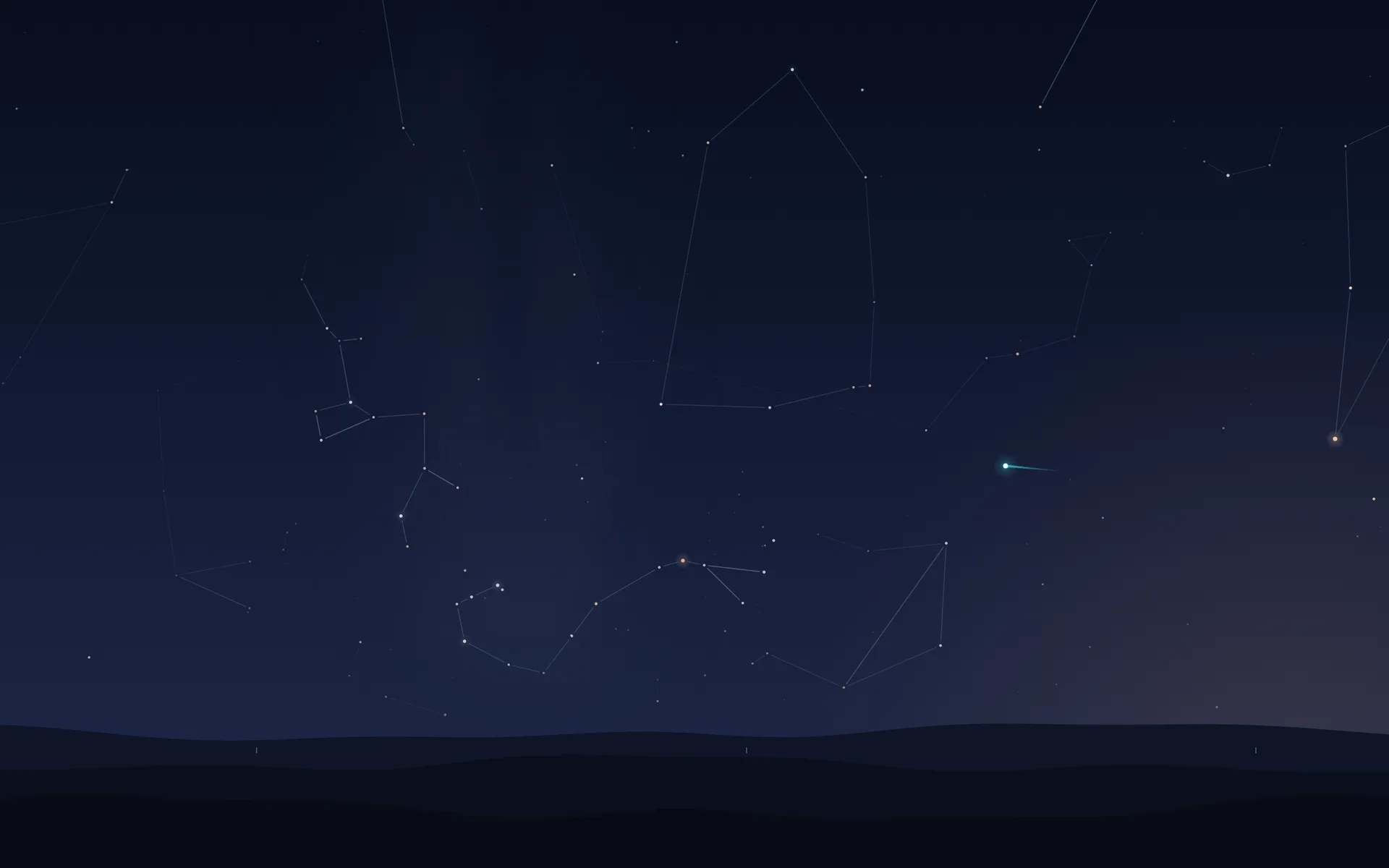
This is the kind I make. Orbit draws the sky over your city as it is this minute, worked out on your Mac: 2,874 stars, thin constellation lines, a faint Milky Way, the five planets you can see without a telescope, and the Moon in its true phase. By day there isn't much up there but the Sun in its glare. Three far hills run along the bottom, the same hills everywhere on Earth.
It's one still picture, redrawn once a minute. The only thing that animates is the International Space Station during a visible pass: a white-hot point in a cyan glow with a short trail, crossing from the second it rises to the second it sets. Visible passes mostly come around dawn and dusk (why the ISS is only visible then).
Orbit also puts a Moon in your menu bar, in tonight's phase. Click it for a card with the next sunrise or sunset, the Moon, the planets, the next visible ISS pass, the next launch and the Kp index for aurora. When a visible pass is due in the next four days, a gold play button on that card plays it on your desktop in twelve seconds, and you can switch on an alert five minutes before the station rises.
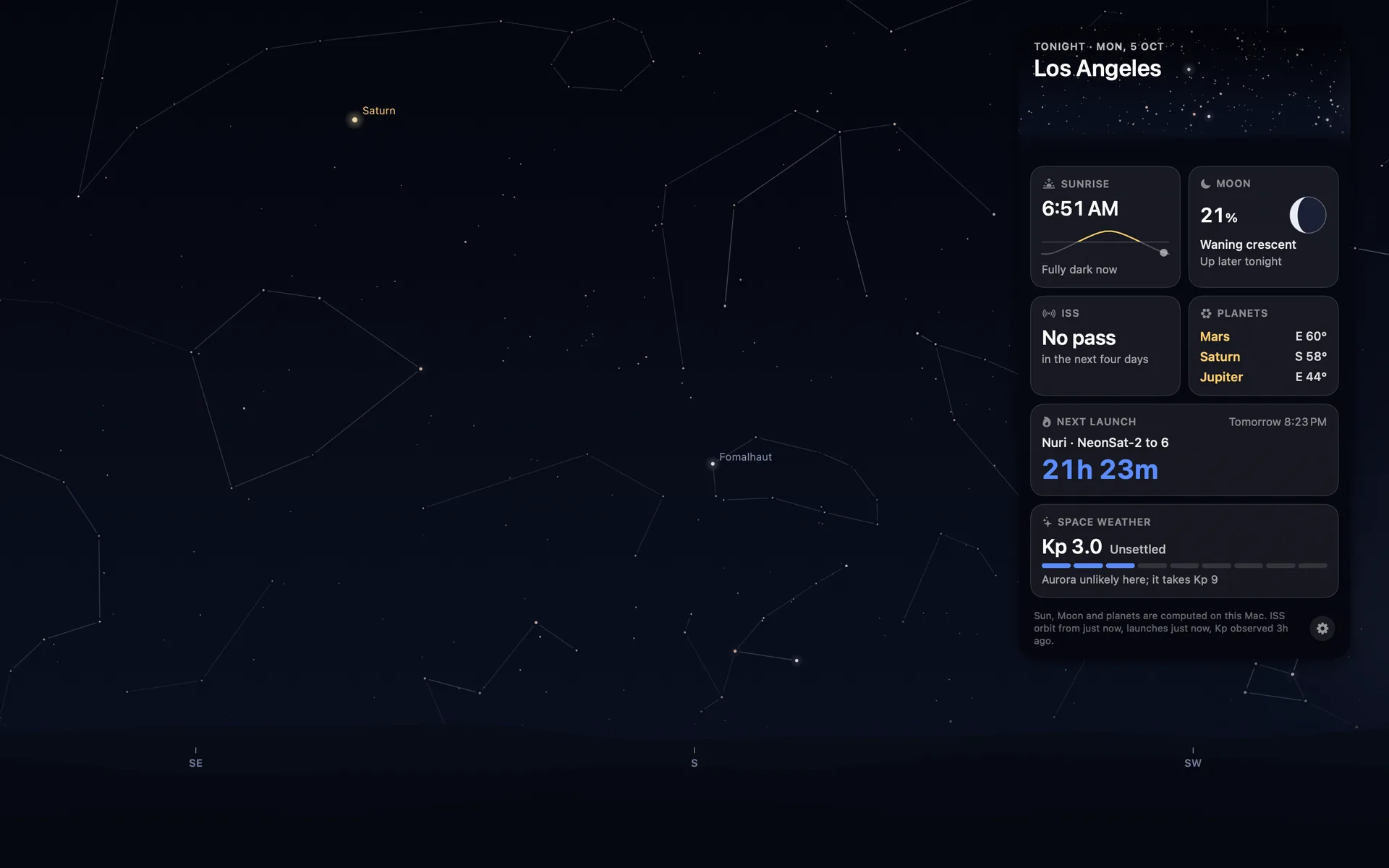
Real time is slow, and you should know that before you buy. On a 1080p display the sky moves about 4 pixels a minute, one screen width in about eight hours. You won't see it move. You look up after a couple of hours and the Sun is somewhere else.
On 10 October, with the app waiting in App Review, I complained about my own app: "no matter how long I keep the app open in the background I don't notice the stars moving or the sun or the moon, it just feels like a static background." So if you want something that visibly moves all day, get a video app.
I like having it there anyway; living with a real sky wallpaper says why.
Open it and the sky appears behind your icons straight away, for a city guessed from your Mac's time zone. Right-click the menu bar Moon to pick Location (13 cities, or Use My Location), Facing (north, east, south or west), Labels on the Sky and Open at Login. The full walkthrough goes through every setting. It's one wallpaper, not a library, and there's no city search beyond the 13 and your own location. It also shows the sky as it would look from a dark field, without your city's light pollution.
Two other Mac apps draw from real data. Stargaze 3D by 3Planesoft ($2.99, last updated March 2025) is a 3D live wallpaper whose listing promises "the real positions of the Sun and the planets", Moon phases and 88 constellations. It doesn't say whether it uses your location.
Living Earth by Radiantlabs ($12.99) is a menu bar clock and weather app whose wallpaper is the whole Earth seen from space, with clouds from satellite data every three hours. For a planetarium you can steer, see astronomy apps for the Mac.
Can you put a live wallpaper on the Mac lock screen?
Apple's aerials are made for it: pick one under Wallpaper in System Settings and it plays as you lock the Mac and as you come back from the lock screen, Tahoe and Golden Gate included. Backdrop, Wallper and Wallspace say they can put video there too (Wallspace on macOS 26 or later, in Pro), and 4K Live Wallpaper offers video screen savers for the lock screen.
Plash and Orbit can't, because of how they work. macOS gives apps no official way to set a live wallpaper, so each is a window just above your wallpaper (Orbit's sits under your desktop icons). Your real wallpaper is never touched: quit Orbit and the old one is simply there again. The flip side is that the lock and login screens show whatever picture is set in System Settings.
If you use Orbit, pick a dark system wallpaper, so locking the Mac after a night sky doesn't throw a bright photo at you.
Does a live wallpaper slow down a Mac or drain the battery?
A video wallpaper decodes video the whole time it's on screen, which is why the makers above pause it behind full-screen apps or on battery. Apple's dynamic wallpapers, and 24 Hour Wallpaper in Apple Dynamic Desktop mode, need no app running at all.
Orbit redraws one still picture a minute instead. On my Mac mini (Apple M6, macOS 27.0, one 1920x1080 display), it averaged 0.04% CPU over five idle minutes and sits at 22 MB of memory idle. It's built to pause when no Orbit window can be seen (a full-screen app, the lock screen, the screen saver, a sleeping display) and on battery below 20%.
I've measured the lock-screen pause, but never the battery one, because my Mac mini has no battery. Nor have I measured Orbit on a laptop, on an Intel Mac or on the GPU. The whole question has its own post on battery drain.
Which live wallpaper app is best for your Mac?
If you want to watch something move, a video app is the honest answer: Wallspace's free tier or Backdrop's untimed trial will tell you whether you like it before you pay, and Plash does a GIF for nothing. If you'd like the sky over your city as it is right now, with the space station crossing it during a pass, that's what I built.
Orbit: Live Sky Desktop is $6.99 once (₹699 in India), and that's the whole price: no subscription and no in-app purchases. You don't need an account. There's no free trial, so the screenshots and details on the Mac page are the fairest preview I can give you. It needs macOS 15 or later and runs on Apple silicon and Intel. It's my first Mac app, on the Mac App Store since 18 October.
Common questions
Can you have a live wallpaper on a Mac?
Yes, with an app. Apple's aerial wallpapers move only as you lock the Mac and come back from the lock screen, and as the screen saver; its dynamic wallpapers change their light through the day. For something that moves while you work you need a video wallpaper app, a web page app such as Plash, or a wallpaper drawn from live data such as Orbit.
Why is my dynamic wallpaper not moving on my Mac?
It isn't meant to move: Apple's dynamic wallpapers brighten and darken over hours. If it never changes, open System Settings, then Wallpaper, and check that the menu beside the picture says Dynamic, not Automatic or one of the Still options. The rest of the fixes, from Location Services to the time zone, are in my guide Dynamic wallpaper not changing on your Mac.
Is Wallpaper Engine available for Mac?
No. Its makers say it is available for Windows and Android, with no immediate plans for other platforms, and Steam lists Windows 10 and 11 only. On a Mac, Backdrop, Wallper and Wallspace are the nearest thing, and Plash shows a web page or GIF.
Is there a free live wallpaper for Mac with no watermark?
Apple's dynamic and aerial wallpapers are free and built in, and Plash is free with no ads. Backdrop's trial has no time limit, but its backdrops (up to three) carry a watermark. Orbit costs $6.99 once and has no watermark.
Can you put a live wallpaper on the Mac lock screen?
Apple's aerials, including the Tahoe and Golden Gate ones, animate at the lock screen. Backdrop, Wallper and Wallspace say they can put video there too (Wallspace on macOS 26 or later), and 4K Live Wallpaper offers video screen savers. Plash says it can't, and Orbit leaves the lock and login screens on your system wallpaper.
Does live wallpaper drain battery on a MacBook?
Video wallpapers keep your Mac busy for as long as they play, which is why most pause on battery or behind full-screen apps. Orbit redraws one still picture a minute and measured 0.04% CPU and 22 MB of memory idle on my Mac mini, and it's built to pause below 20% battery. I haven't measured it on a laptop.
More guides
- Does live wallpaper drain battery on a MacBook?A video wallpaper works on every frame it plays. Mine draws one picture of the sky a minute. Measured CPU and memory, and how to check any app yourself.
- Living with the real night sky as my Mac wallpaperMy Mac's wallpaper is the real night sky over the city I pick, redrawn every minute. What living with it is like, and why Bengaluru sees more sky than LA.
- A live sky wallpaper for Mac that follows your citySee Orbit's Mac sky wallpaper in action: choose a city, preview an ISS pass, open the menu bar briefing and understand what the desktop does between updates.
- A quick tour of Orbit on Android, and where to go after itWatch Orbit's real Android demo, then learn where to find the ISS, explore planets in 3D, move through time and check a rocket launch before heading outside.
- Dynamic wallpaper not changing on your Mac? 8 things to check, in orderMac dynamic wallpaper not changing or moving? Set the menu to Dynamic, then check Location Services, your time zone and Appearance, on Tahoe and macOS 27.
- Earliest sunset of the year 2026, and why it comes before the shortest dayEarliest sunset of the year 2026: 4:28 PM on 7 December in New York, 3:51 PM on 12 December in London, and why it falls before the year's shortest day.
- Free night sky wallpapers for Mac: eight 5K skies, from Orion to a supermoonFree night sky wallpapers for Mac and MacBook in 5K, each a real sky on a real date: Orion over New York, a supermoon, the Southern Cross and the ISS.
- Geminids 2026: the best night to watch, and when the Moon sets in 13 citiesThe Geminids peak on 14 December 2026 at 14:00 UT (7:30 PM in India) under a crescent Moon that sets early. The best night and moonset times for 13 cities.
- How do I know if I saw the ISS? Eight signs, and how to look up the passHow to know if you saw the ISS: a steady light, no blinking, a few minutes to cross. How to look up the pass, and rule out planes, Starlink and Tiangong.
- How my first Mac app got through App Review, Guideline 2.1 letter and allApple sent my first Mac app a Guideline 2.1 Information Needed letter. I answered the same day with a screen recording; it was approved five days later.
- How my Mac live wallpaper idles at 0.04% CPUMy live wallpaper idles at 0.04% CPU on a Mac. How it draws one picture of the sky a minute, stops when you can't see it, and what ate its memory instead.
- How to find Orion and its belt, with times for 13 citiesHow to find Orion: its belt is three stars in a short, straight row, low in the east on November evenings. Times for 13 cities, and why Australia flips it.
- How to find the North Star, and how high Polaris sits over your cityFind the North Star from the Big Dipper or Cassiopeia's W. It stands about as high as your latitude: 52° in London, 41° in New York, 13° in Bengaluru.
- How to get a live wallpaper on a MacBook Neo without eating its 8 GBYes, a MacBook Neo can run a live wallpaper. Which kinds go easy on its 8 GB, the free ones Apple ships, the 2408 by 1506 size, and what my app weighs.
- How to get ISS pass alerts on a Mac, now that NASA's space station emails are goneNASA stopped Spot the Station's email and text alerts on 12 June 2025. Here's how to get ISS pass alerts now, on your phone or right on your Mac's desktop.
- How to put the Moon phase in your Mac menu bar (or a widget)Six apps put the Moon phase in a Mac or MacBook menu bar, from free to $6.99. Also: how to add a Moon widget, what Weather shows, and 2026's full moons.
- How to see the ISS from India: when, which way to face and how high to lookThe ISS shows up over India in short runs at dawn and dusk. How to get the times for your city, which way to face, how high to look and why cities differ.
- Is the ISS coming down? Yes, on purpose, after it retires in 2030Yes, the ISS is coming down, on purpose: NASA plans to retire it in 2030 and sink it in the South Pacific. Why it can't stay up, and how to see it first.
- Leonid meteor shower 2026: the best night and hours to watch, city by cityThe Leonid meteor shower peaks on 17 to 18 November 2026. The half Moon sets near midnight, so the hours before dawn are dark. Best times for 10 cities.
- Mac apps without a subscription: 14 you can buy onceMac apps without a subscription: 14 you can buy once in 2026, from Magnet at $4.99 to BBEdit at $59.99, with update terms where the seller states them.
- Mars and Jupiter conjunction, November 2026: what time to look in your cityMars and Jupiter conjunction: 1.2 degrees apart before dawn, 15 and 16 November 2026. Times for New York, London, Bengaluru and Sydney, and which is which.
- Quadrantid meteor shower 2027: when to look in 16 cities, India includedThe Quadrantids peak on 4 January 2027 at 03:25 UT, for only a few hours, under a thin crescent Moon. When and where to look in 16 cities, India included.
- Supermoons in November and December 2026: the Beaver Moon and the Cold MoonTwo supermoons end 2026: the Beaver Moon on 24 November and the Cold Moon on 23 to 24 December, the year's closest full Moon. Moonrise times for 8 cities.
- The best astronomy apps for Mac in 2026, and which ones are iPad appsThe best astronomy apps for Mac in October 2026: Stellarium, Night Sky, SkySafari, Starry Night 8 and more, with US prices and which ones are iPad apps.
- What is the bright star in the east before sunrise? Late 2026, date by dateThe bright star in the east before sunrise is Jupiter, then Venus from early November 2026. Where to look and how high, for New York, London and Bengaluru.
- Why the ISS is only visible at dawn and duskWe wrote the code that decides when the ISS is visible. The three tests it runs, the geometry of Earth's shadow, and 30 days of real passes over Bengaluru.