
Mac apps without a subscription: 14 you can buy once
Mac apps without a subscription: 14 you can buy once in 2026, from Magnet at $4.99 to BBEdit at $59.99, with update terms where the seller states them.
Plenty of well-known Mac apps still sell for one price. Magnet is $4.99, DaisyDisk $9.99, iStat Menus 7 $11.99, Things 3 $49.99 and BBEdit $59.99 direct from Bare Bones, and the table below has 14 in all, including Orbit, the sky wallpaper I make ($6.99). What "one-time" buys is usually the version you pay for and its smaller updates, and a big new version can cost extra.
Since Orbit is mine, it gets one row in the table like everyone else and one short section at the end, which you're free to skip. It also sneaks into the menu bar part once, to apologise. Prices are US dollars before tax unless marked, read on 20 October 2026.
One-time purchase Mac apps at a glance (October 2026 prices)
| App | What it does | One-time price | Where to buy |
|---|---|---|---|
| DaisyDisk | Shows what fills your disk | $9.99 | Mac App Store or daisydiskapp.com |
| Keka | Zips and unzips archives | $6.49 (free from its site) | Mac App Store or keka.io |
| iStat Menus 7 | System stats in the menu bar | $11.99 (weather is extra) | Mac App Store or bjango.com |
| PDF Squeezer 4 | Makes PDFs smaller | $19.99 | Mac App Store |
| Wipr 2 | Blocks ads in Safari | $4.99 (iPhone, iPad, Mac and Vision Pro) | Mac App Store |
| Magnet | Snaps windows into place | $4.99 | Mac App Store |
| Rectangle Pro | Window snapping, more controls | $9.99 | rectangleapp.com |
| Alfred Powerpack | Launcher and workflows | £34, sold in pounds | alfredapp.com |
| Bartender 7 | Tidies the menu bar | $25 | macbartender.com |
| Things 3 | To-do lists | $49.99 (Mac app only) | Mac App Store |
| Typora | Markdown writing | $14.99 | typora.io |
| BBEdit 16 | Text and code editor | $59.99 (direct licence) | barebones.com |
| CleanShot X | Screenshots and recording | $35 | cleanshot.com |
| Orbit: Live Sky Desktop | The real sky as your wallpaper | $6.99 | Mac App Store |
What does "one-time purchase" mean for updates?
"Pay once" covers several different deals, and the difference is nearly always in the updates.
On the Mac App Store, a paid app stays with your Apple Account, and you can download it again on your Macs. A listing that says "Up to six family members can use this app with Family Sharing enabled" can be shared with up to five other people in your family group. In-app purchases work differently. Apple's page says they can't be downloaded again, though some can be restored if you bought them through Apple.
A version number in an app's name is a hint about how the next big version gets paid for. iStat Menus 7 and PDF Squeezer 4 carry theirs on the store, Bjango sells an upgrade from iStat Menus 6 for $9.99 on its own site, and BBEdit 16 costs $29.99 to upgrade from version 15. Setapp goes the other way. It's a subscription bundle, which Bjango's page puts at US$9.99 a month for iStat Menus plus more than 250 other apps.
Outside the store, each buy page words its licence differently, so here is what each one says:
| Licence | Macs | Updates | Try first |
|---|---|---|---|
| DaisyDisk, direct | Up to 5 personal Macs | Minor updates and bug fixes | 30-day money-back guarantee |
| Rectangle Pro | 3 at a time | Some may be free, others may cost extra | 10-day free trial, 14-day refund window |
| Alfred Powerpack, Single | 2 of your own Macs | The current version, plus a free upgrade to Alfred 6 if bought now | Alfred itself is free |
| Alfred Powerpack, Mega Supporter | Your own Macs | Free upgrades for life | Alfred itself is free |
| Bartender 7 | All the Macs you own and mainly use | All Bartender 7 updates | 4-week trial |
| Typora | 3 devices of one person | No renewal fee (the page doesn't say which versions) | 15-day free trial |
| CleanShot X Basic | More seats can be added | 1 year, then optional renewal at $19 a year | 30-day money-back guarantee |
| BBEdit 16, direct | Individual licence | Paid upgrades between big versions | 30-day evaluation |
Mac utilities you can buy once
DaisyDisk draws your disk as rings, so the folders eating your space look as big as they are. The Mac App Store and daisydiskapp.com both charge $9.99. The five-Mac limit in the licence table is the direct licence's, and a store copy follows Apple's terms instead.
Keka works like an honesty box. The file archiver (zip, 7z and plenty of other formats) is free from keka.io, or $6.49 on the Mac App Store, and the developer says the store copy is the same app, so paying there is a way to support it.
iStat Menus 7 puts your Mac's readings in the menu bar: CPU, GPU, memory, disks, network and sensors. $11.99 buys it once, on the store or from Bjango, and the only subscription inside it is the optional weather, $0.99 a month or $4.99 a year once the six months every licence includes run out. Bjango also sells a Family Pack for up to five family members at $14.99.
PDF Squeezer 4 makes PDFs smaller: drop one in and it compresses it. The Mac App Store listing is $19.99 with no in-app purchases, and Witt Software sells it direct too.
Wipr 2 blocks ads, trackers and cookie banners in Safari. One $4.99 purchase covers it on iPhone, iPad, Mac and Vision Pro, which its listing calls "a universal app", and Family Sharing is supported. Filtr, an optional add-on that blocks across apps, is a separate in-app purchase.
Window and menu bar apps without a subscription
Magnet snaps windows to halves, thirds and quarters of the screen, by dragging or with a keyboard shortcut. It costs $4.99, and the feature list on its listing ends with "Perpetual license", "No subscription" and "No in-app purchases". The last store update was version 3.0.7, on 12 April 2025, and it needs macOS 13 or later.
Rectangle does the same job for free. It's open source and runs on macOS 10.15 or later. Rectangle Pro, the paid edition with more controls, is $9.99 from the developer's checkout.
The Alfred Powerpack is the paid add-on to the free Alfred launcher, and it's where the workflows and clipboard history live. Alfred's shop sells it in pounds: £34 for a Single licence, or £59 for Mega Supporter.
Bartender hides and arranges the icons in your menu bar, and it now sells three ways. Bartender 7 is $25 once, and the buy page says that purchase "includes all updates to this version". Bartender Pro is $20 a year. Mega Supporter is $80 (marked as a launch discount on 20 October), sold as lifetime access with all future upgrades.
If you've just paid $25 to tidy your menu bar, I'm sorry to say Orbit adds one more thing to it, a small Moon drawn in tonight's phase with the next pass or launch written beside it. You can switch the words off and keep just the Moon.
Writing and productivity apps you pay for once
Things 3, the to-do app, is $49.99 on the Mac App Store, and that buys the Mac app only. The iPhone and iPad versions (and the Watch and Vision Pro ones) are separate purchases. Sync through Things Cloud costs nothing, and there's a 15-day Mac trial on things.app.
Typora is a Markdown editor where the formatting shows up as you type, on macOS, Windows and Linux. typora.io sells it for $14.99.
BBEdit 16 is sold both ways, and which one you get depends on where you click. On the Mac App Store it's a free download with a subscription ($4.99 a month or $49.99 a year). From Bare Bones it's a $59.99 licence you buy once, and upgrading costs $29.99 from version 15 or $39.99 from 14 or older. When its 30-day evaluation ends, BBEdit keeps running in Free Mode "for free, forever", with fewer features.
CleanShot X takes screenshots and screen recordings and lets you mark them up. CleanShot Basic is $35, sold as "Pay once, use forever", with 1 GB of CleanShot Cloud included (a Pro subscription exists for teams).
Mac wallpaper apps: one-time, lifetime or free
24 Hour Wallpaper is a free download of 5K wallpapers, mostly photographs of real places, that change through the day with the time where you are. Eight are free and 165 more are for sale, one at a time (the ones listed are $2.49) or all of them for $29.99 as a lifetime purchase. There's a 14-day free trial, and it needs macOS 15 or later.
Plash puts any website on your desktop as the wallpaper, free and with no ads. When its FAQ asks why, Sindre Sorhus answers "I just enjoy making apps." The current version needs macOS 26.4 or later.
There are more in how to get a live wallpaper on a Mac, free sky pictures in free night sky wallpapers for Mac, and planetarium apps in the best astronomy apps for Mac.
Is Affinity free now, and is Pixelmator Pro a subscription?
Affinity went free. On 30 October 2025 Canva announced a new Affinity that does photo, vector and layout work in one app, free for individuals, and you need a free Canva account to download it (CG Channel). On 20 October 2026 affinity.studio still said "Affinity is free for individuals", with its AI tools needing a paid Canva plan. The old one-time Affinity V2 apps came off sale and get no more updates, though CG Channel reports their activation servers stay online for reinstalls.
On 13 January 2026, Apple announced Apple Creator Studio, its creative apps for $12.99 a month or $129 a year, and said the Mac versions stay on sale "individually as a one-time purchase on the Mac App Store" (Apple Newsroom). On 20 October the store had Pixelmator Pro at $49.99, Logic Pro at $199.99 and Final Cut Pro at $299.99. Apple sells Pixelmator Pro twice, as the one-time Pixelmator Pro and a separate listing called Pixelmator Pro: Edit Images:
| Listing | Price | Version | Last updated |
|---|---|---|---|
| Pixelmator Pro | $49.99 once | 3.8 | 9 April 2026 |
| Pixelmator Pro: Edit Images | Free download, unlocked by Creator Studio ($12.99 a month or $129 a year) | 4.4 | 29 September 2026 |
What to check before you buy a one-time Mac app
Four checks, all on the listing or the buy page:
- Read the updates line, if there is one. It might cover the current version, one year, or every version for life.
- Count the Macs, and check whether the licence is for one person or a family.
- Check the date of the last update and the macOS it needs.
- Try it first where you can, with a trial, a free mode or a money-back guarantee.
Orbit: a live sky wallpaper for $6.99 once
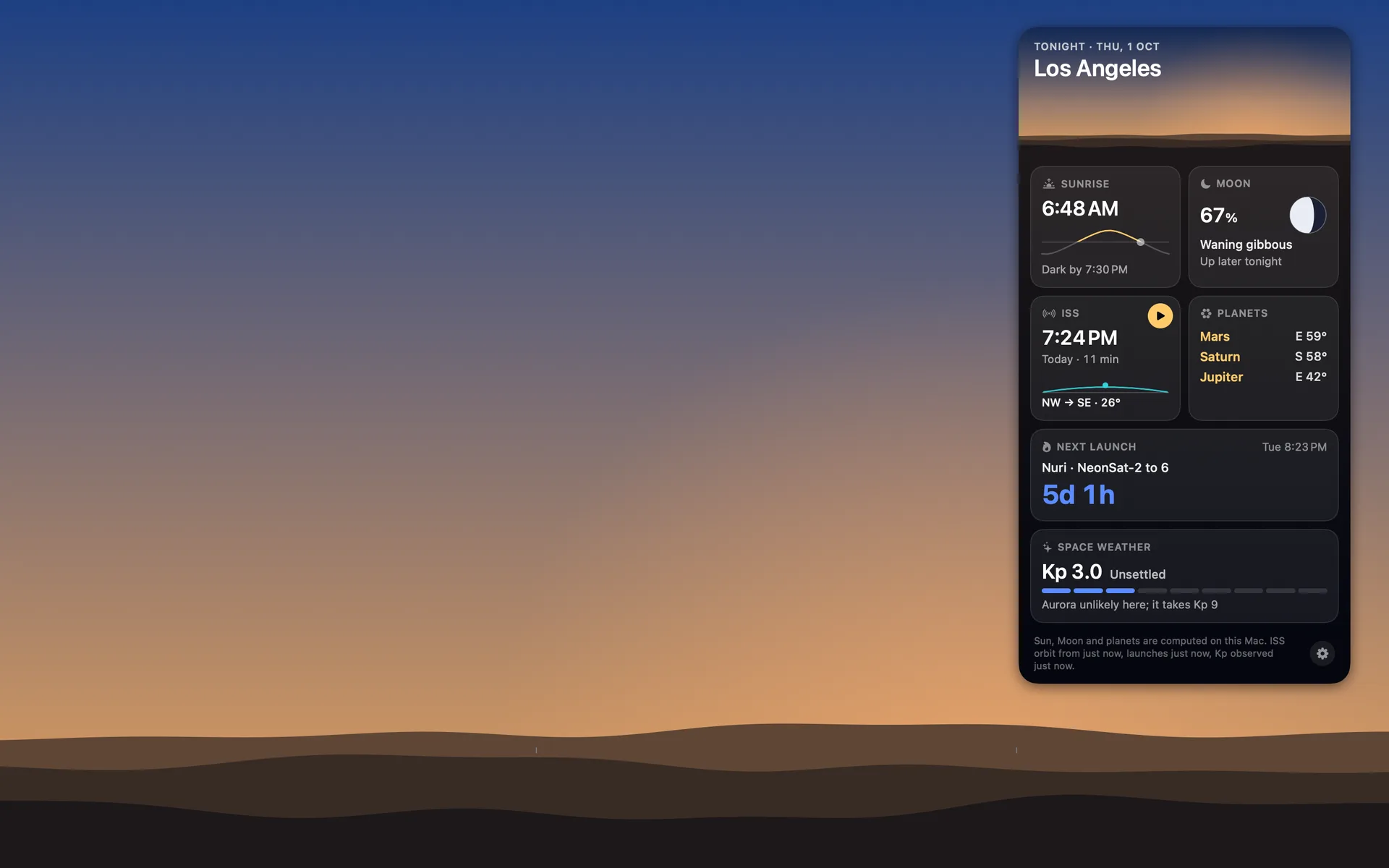
Orbit: Live Sky Desktop is $6.99 once on the Mac App Store (₹699 in India). There's nothing to buy inside it, no account and no ads, and the privacy label reads Data Not Collected. It draws the real sky over your city as your wallpaper, worked out on the Mac from 2,874 stars, with the Moon in its true phase and the planets where they are, and during a visible pass the space station crosses your desktop. Like any paid Mac App Store app, it downloads again on your other Macs. There's no trial, but the Mac page has screenshots. It needs macOS 15 or later on Apple silicon or Intel, the download is about 1.4 MB, and on my Mac mini it averaged 0.04% of one CPU core over five idle minutes (how that works).
It has been on the store since 18 October and has no ratings yet. When I settled on $6.99 on 5 October, what I asked for next was "let's make it crazy cool so people don't bat an eye while paying it". That evening I found out every build so far had shipped without an icon, so crazy cool had some catching up to do.
Common questions
Are apps a one time purchase?
Some are. A paid app on the Mac App Store with no in-app purchases is bought once, stays under your Apple Account and can be downloaded again on your Macs. Others are free downloads that sell a subscription or a lifetime purchase inside, and the listing's In-App Purchases section shows which. The developer's licence says which updates the price covers.
What are the best one time purchase Mac apps?
Well-known ones you can still buy once, at US prices on 20 October 2026, include DaisyDisk ($9.99), Magnet ($4.99), iStat Menus 7 ($11.99), Things 3 ($49.99), Typora ($14.99), CleanShot X ($35), BBEdit ($59.99 direct), Bartender 7 ($25) and the Alfred Powerpack (£34). Pick by what you need, then check how many Macs and which updates each licence covers.
Do one-time purchase Mac apps get free updates?
Usually for the version you bought. DaisyDisk's direct licence includes minor updates, CleanShot X includes one year of them, Bartender 7 covers every Bartender 7 update, and Alfred's Single licence covers the current version, with a free upgrade to Alfred 6 if you buy now. A big new version can be a paid upgrade, as with BBEdit and iStat Menus, or a new store listing.
Are there lifetime licence Mac apps?
Yes. Some apps sell a lifetime option beside a subscription. Bartender's Mega Supporter ($80, marked as a launch discount on 20 October 2026) covers every future version, Alfred's Mega Supporter (£59) comes with lifetime upgrades, and 24 Hour Wallpaper sells lifetime access to all its wallpapers for $29.99 inside the app.
Is Pixelmator Pro a one-time purchase?
On the Mac, yes. Pixelmator Pro is $49.99 once on the Mac App Store. Apple also offers it inside the Apple Creator Studio subscription ($12.99 a month or $129 a year), which it announced on 13 January 2026, as a separate listing called Pixelmator Pro: Edit Images.
More guides
- How to get a live wallpaper on a Mac: what moves, and what it costsHow to get a live wallpaper on a Mac, free or paid: Apple's aerials, video apps, Plash for GIFs and the real sky over your city, with what each one costs.
- Free night sky wallpapers for Mac: eight 5K skies, from Orion to a supermoonFree night sky wallpapers for Mac and MacBook in 5K, each a real sky on a real date: Orion over New York, a supermoon, the Southern Cross and the ISS.
- The best astronomy apps for Mac in 2026, and which ones are iPad appsThe best astronomy apps for Mac in October 2026: Stellarium, Night Sky, SkySafari, Starry Night 8 and more, with US prices and which ones are iPad apps.
- Does live wallpaper drain battery on a MacBook?A video wallpaper works on every frame it plays. Mine draws one picture of the sky a minute. Measured CPU and memory, and how to check any app yourself.
- A live sky wallpaper for Mac that follows your citySee Orbit's Mac sky wallpaper in action: choose a city, preview an ISS pass, open the menu bar briefing and understand what the desktop does between updates.
- A quick tour of Orbit on Android, and where to go after itWatch Orbit's real Android demo, then learn where to find the ISS, explore planets in 3D, move through time and check a rocket launch before heading outside.
- Dynamic wallpaper not changing on your Mac? 8 things to check, in orderMac dynamic wallpaper not changing or moving? Set the menu to Dynamic, then check Location Services, your time zone and Appearance, on Tahoe and macOS 27.
- Earliest sunset of the year 2026, and why it comes before the shortest dayEarliest sunset of the year 2026: 4:28 PM on 7 December in New York, 3:51 PM on 12 December in London, and why it falls before the year's shortest day.
- Geminids 2026: the best night to watch, and when the Moon sets in 13 citiesThe Geminids peak on 14 December 2026 at 14:00 UT (7:30 PM in India) under a crescent Moon that sets early. The best night and moonset times for 13 cities.
- How do I know if I saw the ISS? Eight signs, and how to look up the passHow to know if you saw the ISS: a steady light, no blinking, a few minutes to cross. How to look up the pass, and rule out planes, Starlink and Tiangong.
- How my first Mac app got through App Review, Guideline 2.1 letter and allApple sent my first Mac app a Guideline 2.1 Information Needed letter. I answered the same day with a screen recording; it was approved five days later.
- How my Mac live wallpaper idles at 0.04% CPUMy live wallpaper idles at 0.04% CPU on a Mac. How it draws one picture of the sky a minute, stops when you can't see it, and what ate its memory instead.
- How to find Orion and its belt, with times for 13 citiesHow to find Orion: its belt is three stars in a short, straight row, low in the east on November evenings. Times for 13 cities, and why Australia flips it.
- How to find the North Star, and how high Polaris sits over your cityFind the North Star from the Big Dipper or Cassiopeia's W. It stands about as high as your latitude: 52° in London, 41° in New York, 13° in Bengaluru.
- How to get a live wallpaper on a MacBook Neo without eating its 8 GBYes, a MacBook Neo can run a live wallpaper. Which kinds go easy on its 8 GB, the free ones Apple ships, the 2408 by 1506 size, and what my app weighs.
- How to get ISS pass alerts on a Mac, now that NASA's space station emails are goneNASA stopped Spot the Station's email and text alerts on 12 June 2025. Here's how to get ISS pass alerts now, on your phone or right on your Mac's desktop.
- How to put the Moon phase in your Mac menu bar (or a widget)Six apps put the Moon phase in a Mac or MacBook menu bar, from free to $6.99. Also: how to add a Moon widget, what Weather shows, and 2026's full moons.
- How to see the ISS from India: when, which way to face and how high to lookThe ISS shows up over India in short runs at dawn and dusk. How to get the times for your city, which way to face, how high to look and why cities differ.
- Is the ISS coming down? Yes, on purpose, after it retires in 2030Yes, the ISS is coming down, on purpose: NASA plans to retire it in 2030 and sink it in the South Pacific. Why it can't stay up, and how to see it first.
- Leonid meteor shower 2026: the best night and hours to watch, city by cityThe Leonid meteor shower peaks on 17 to 18 November 2026. The half Moon sets near midnight, so the hours before dawn are dark. Best times for 10 cities.
- Living with the real night sky as my Mac wallpaperMy Mac's wallpaper is the real night sky over the city I pick, redrawn every minute. What living with it is like, and why Bengaluru sees more sky than LA.
- Mars and Jupiter conjunction, November 2026: what time to look in your cityMars and Jupiter conjunction: 1.2 degrees apart before dawn, 15 and 16 November 2026. Times for New York, London, Bengaluru and Sydney, and which is which.
- Quadrantid meteor shower 2027: when to look in 16 cities, India includedThe Quadrantids peak on 4 January 2027 at 03:25 UT, for only a few hours, under a thin crescent Moon. When and where to look in 16 cities, India included.
- Supermoons in November and December 2026: the Beaver Moon and the Cold MoonTwo supermoons end 2026: the Beaver Moon on 24 November and the Cold Moon on 23 to 24 December, the year's closest full Moon. Moonrise times for 8 cities.
- What is the bright star in the east before sunrise? Late 2026, date by dateThe bright star in the east before sunrise is Jupiter, then Venus from early November 2026. Where to look and how high, for New York, London and Bengaluru.
- Why the ISS is only visible at dawn and duskWe wrote the code that decides when the ISS is visible. The three tests it runs, the geometry of Earth's shadow, and 30 days of real passes over Bengaluru.