
Living with the real night sky as my Mac wallpaper
My Mac's wallpaper is the real night sky over the city I pick, redrawn every minute. What living with it is like, and why Bengaluru sees more sky than LA.
My Mac's wallpaper is the real sky over the city I pick, worked out for this minute instead of borrowed from a photo or a video loop. The stars and planets sit where they are over that city right now, and the Moon shows its true phase. By day the sky turns blue, and when the space station makes a visible pass, it crosses the screen. The app is Orbit for Mac, and I made it.
Search for a night sky or space wallpaper for a MacBook and you mostly get still photos and looping videos. They're nice to look at, but none of them knows where you are. Orbit computes the sky on the Mac from a catalogue of 2,874 stars and redraws it once a minute, and while the desktop is hidden it doesn't draw or download anything.
What a real night sky wallpaper on a Mac looks like
Orbit's sky sits behind your desktop icons, so clicks go straight through to them, and it's there on every Space. It never changes your own wallpaper: quit Orbit and your picture is back, and the login and lock screens show it the whole time.
The view is a panorama 120 degrees wide, facing north, east, south or west. Turn on Labels on the Sky and it names the brightest stars, the planets, the Moon with how much of it is lit, and the compass points. The sky can be any of 13 cities in the menu, or your own spot through Use My Location, which keeps your coordinates on the Mac. The three far hills along the bottom are the same wherever you pick, Reykjavík or Sydney.
My dad caught a glimpse of it once and told me it was like someone had opened a window in the Earth, and the night sky was right there on my Mac.
The iPhone's Astronomy wallpaper is a different idea, showing the Earth, the Moon or the solar system from space, and the Mac doesn't have one. On a Mac, a wallpaper that keeps moving while you work comes from an app, and how to get a live wallpaper on a Mac compares the options.
Orbit also puts a small Moon in the menu bar, drawn in tonight's phase. Click it for tonight's briefing card, or right-click it for the settings. Every setting is in the full walkthrough.
Why I made a sky wallpaper in the first place
I make apps on my own in Bengaluru, and Orbit is my first for the Mac, on the Mac App Store since 18 October. It started when I was studying physics in high school and read about the Pale Blue Dot. That's the photo Voyager 1 took of Earth on 14 February 1990, looking back from about 6 billion kilometres out, at Carl Sagan's suggestion. Earth comes out about a pixel in size.
Sagan's essay about it, in his 1994 book Pale Blue Dot, calls Earth "a mote of dust suspended in a sunbeam", and it got me hooked on all things extraterrestrial. Then one day I wondered what view the people on the ISS must have. A busy one, it turns out. NASA says the station goes round Earth 16 times a day, so its crew gets 16 sunrises and 16 sunsets between one breakfast and the next.
One thing led to another. First came Orbit on Android, a free app for ISS passes and the night sky, on Google Play since 9 August 2026. Then this one, my first paid app. Getting it past Apple took one form letter from App Review and five days of waiting, which I've written up in how my first Mac app got through App Review.
Is the night sky different in other countries?
I noticed that Bengaluru had a lot fewer stars than California. So for a good while I went through the menu country by country, seeing which one had the most constellations.
Orbit draws each city's sky as you'd see it from a dark field at that spot. It doesn't add city lights, and it doesn't fade stars for moonlight. The real cities are another matter: more than 80% of the world's people live under light-polluted skies, according to the 2016 world atlas of artificial night sky brightness.
The number of stars Orbit draws depends only on how far the Sun is below that city's horizon. Until it's 2 degrees down, Orbit draws no stars at all. Once it's 18 degrees down, it draws the whole catalogue.
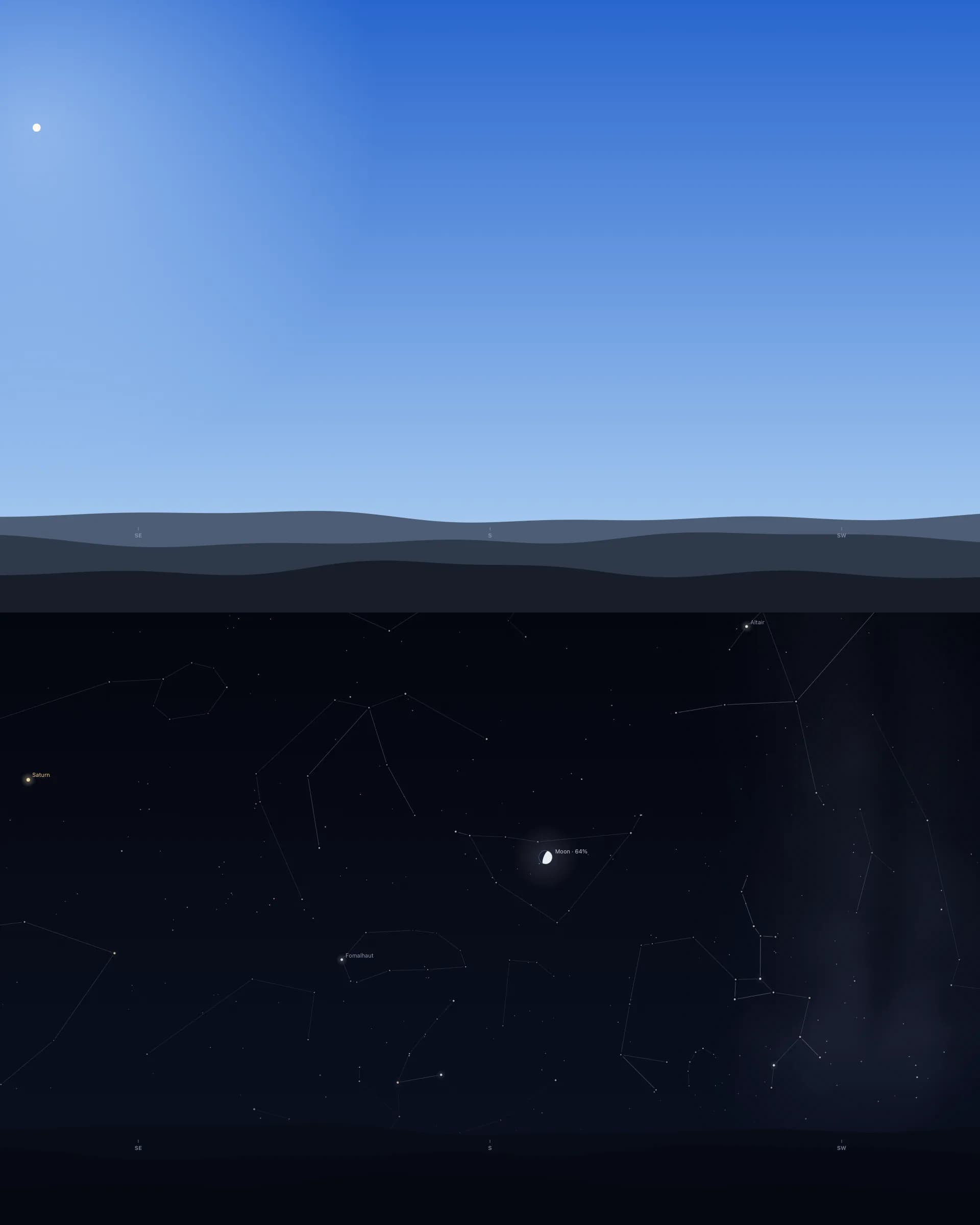
Bengaluru and California are twelve and a half hours apart (thirteen and a half once US clocks go back on 1 November). When one has night, the other mostly has day or twilight, so whenever Bengaluru showed fewer stars, it was lighter in Bengaluru at that moment. My big discovery was mostly a discovery about time zones.
Orbit drew the picture below for a single instant, with Bengaluru on top and Los Angeles underneath, both facing south.
Latitude matters too. It decides which stars come up at all. Polaris stands about as high as your latitude, so it's about 34 degrees up over Los Angeles and 13 over Bengaluru. From Reykjavík, 28% of the sky circles the pole and never sets, and from Sydney so does Acrux, the brightest star in the Southern Cross.
Can you see the Southern Cross from India?
From Bengaluru, yes, low in the south on April and May evenings. It also answers the question I'd been asking, which city has the most constellations. Over a year, it's the one I live in. Bengaluru gets to see 98.7% of the sky and Los Angeles 91.4%.
Stars have a latitude of their own on the sky, called declination. From 13 degrees north, like Bengaluru, you miss only the stars within 13 degrees of the sky's south pole. From Los Angeles, at 34 degrees north, you miss everything within 34 degrees of it.
The Southern Cross sits between about 57 and 63 degrees south. From Bengaluru its brightest star, Acrux, climbs to about 14 degrees above the southern horizon at best. From Los Angeles it never rises at all (its highest point is 7 degrees below the horizon), and the whole cross is out of sight all year. EarthSky puts the cut-off for seeing Acrux at about 27 degrees north, which takes in Mumbai and Chennai but not Delhi.
In mid-October the cross is above the horizon only in daylight. Going by the catalogue positions, Acrux stands highest due south from Bengaluru around a quarter to midnight on 6 April 2027, and around 9 PM on 20 May.
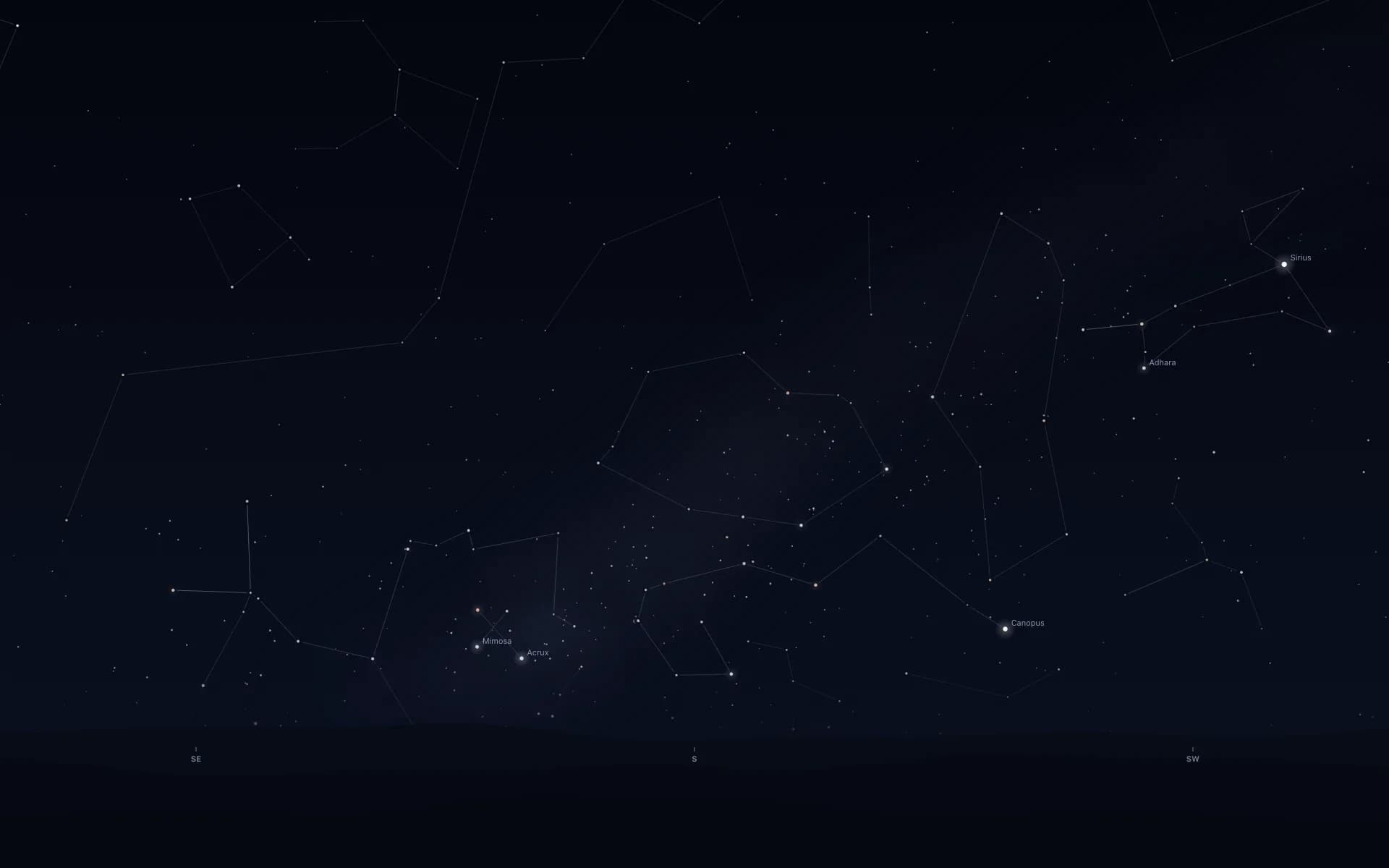
Here's the whole menu, by how much of the sky each city ever sees:
| City | Latitude | Share of the sky | Farthest stars it ever sees (sky latitude) |
|---|---|---|---|
| Bengaluru | 13° N | 98.7% | 77° south |
| San Diego | 33° N | 92.1% | 57° south |
| Sydney | 34° S | 91.5% | 56° north |
| Los Angeles | 34° N | 91.4% | 56° south |
| Tokyo | 36° N | 90.6% | 54° south |
| Seoul | 38° N | 89.6% | 52° south |
| San Francisco | 38° N | 89.5% | 52° south |
| Denver | 40° N | 88.4% | 50° south |
| New York | 41° N | 87.9% | 49° south |
| Chicago | 42° N | 87.2% | 48° south |
| London | 52° N | 81.1% | 38° south |
| Berlin | 53° N | 80.4% | 37° south |
| Reykjavík | 64° N | 71.8% | 26° south |
Does a real-time sky wallpaper move?
Yes, at the sky's own pace, which is slow. The one quick thing is the space station during a pass, which crosses in minutes. The sky turns 15 degrees an hour, and the panorama is 120 degrees across, so on a 1920-pixel-wide screen that comes to about four pixels a minute, or one screen width in about eight hours. It's like the hour hand on a clock: you notice it when you look up after an hour or two and the Sun or the stars have moved.
For me it's a pleasant distraction. I like seeing the Sun move from east to west and the constellations change, and it gives me a sense of movement even though my work is mostly done sitting in one place. If you live north of the equator, Orbit faces south to start with, so east is on your left and the Sun goes left to right.
The clip below is a day over Los Angeles squeezed into 15 seconds by the same drawing code as the app on sale. The speed-up is for this page; on your desktop the sky moves at the real pace.
The ISS passing overhead, and the alert that pulled me out of a daze
I was zoning out on work when I got an ISS alert from Orbit. It got me thinking straight away, and it motivated me in a strange way: there's this massive object out there, man-made, in space, and there are people living on it right now.
It is massive. NASA's facts and figures put it at 109 metres end to end, about the length of a football pitch, and it goes round Earth at about 8 kilometres a second. It flies about 420 kilometres up, and people have lived aboard without a break since November 2000. NASA's update of 13 October 2026 counted seven people on the crew.
On the Mac, the alert says "ISS rises in 5 minutes", and under it something like "Northwest at 7:24 PM, climbing to 26°. In view for 11 minutes, low in the sky." The last words follow how high the pass climbs: "very bright" from 60°, "bright" from 35° and "low in the sky" below that. Orbit doesn't forecast brightness. Alerts are silent and stay off until you switch on ISS Passes under Alerts in the Moon's right-click menu.
During the pass, the station crosses the desktop as a white-hot point in a cyan glow with a short trail, from the moment it rises until it sets or fades into Earth's shadow.
Alerts have one limit worth knowing. Orbit plans them while its desktop is on screen, so a Mac left behind a full-screen app for days runs out of them. Setting up ISS pass alerts on a Mac walks through it, and the reason passes bunch up around sunrise and sunset is in why the ISS is only visible at dawn and dusk. If you're in India, here's how to see the ISS from India.
A rocket launch countdown in my Mac's menu bar
I follow launches closely, and sometimes I keep the live streams open as background noise. Orbit doesn't link to the streams (I open those myself), but it keeps the countdown in front of me.
Click the Moon and the briefing card shows the next launch with a big blue countdown. When no visible ISS pass is due within 20 hours, the menu bar itself says something like "Launch in 9h 10m". There's an optional alert 30 minutes before liftoff for launches marked "Go", and the times come from Launch Library 2, checked once an hour, so when a launch slips, the countdown slips with it.
Getting the real sky on your own Mac
Orbit: Live Sky Desktop is $6.99 once on the Mac App Store (₹699 in India), with no subscription and no account. It needs macOS 15 or later, is built for Apple silicon and Intel Macs, and is about 1.4 MB. It pauses behind full-screen apps, while the display sleeps and on battery below 20%. Measured idle for five minutes on my Mac mini, with the desktop in view on one 1080p display, a Release build averaged 0.04% of the CPU (more on battery). The Mac page has the screenshots.
Common questions
Is the iPhone Astronomy wallpaper real time?
It changes through the day, but it shows something else. Apple describes it as views of the Earth, the Moon and the solar system, and the Earth view centres on your location with the day and night sides marked. It doesn't draw the stars over your head, and the Mac has no Astronomy wallpaper at all.
Can I get rocket launch notifications on a Mac?
Yes. Orbit for Mac has an optional alert 30 minutes before liftoff, for launches in the next two days that the provider has marked "Go". When no visible ISS pass is due within 20 hours, its menu bar also shows a countdown such as "Launch in 9h 10m". The times come from Launch Library 2, checked once an hour.
Do we see the Moon in real time?
Almost. The Moon is on average 384,400 kilometres away, so its light takes about 1.3 seconds to reach you. Orbit's desktop Moon is computed for the current minute and drawn in its true phase.
Why do constellations move?
Two motions. Earth's spin turns the whole sky about 15 degrees an hour, and its trip round the Sun makes each star rise about four minutes earlier every night, so the evening sky changes with the seasons. On Orbit's desktop that spin comes to about four pixels a minute on a 1080p screen.
Is there a real night sky wallpaper for Mac?
Yes. Orbit: Live Sky Desktop draws the sky over one of 13 cities or your own location, with 2,874 stars, the five bright planets and the Moon where they are, daylight by day and the ISS crossing during visible passes. It redraws once a minute and costs $6.99 once on the Mac App Store, for macOS 15 or later.
More guides
- How to get a live wallpaper on a Mac: what moves, and what it costsHow to get a live wallpaper on a Mac, free or paid: Apple's aerials, video apps, Plash for GIFs and the real sky over your city, with what each one costs.
- How to get ISS pass alerts on a Mac, now that NASA's space station emails are goneNASA stopped Spot the Station's email and text alerts on 12 June 2025. Here's how to get ISS pass alerts now, on your phone or right on your Mac's desktop.
- How my first Mac app got through App Review, Guideline 2.1 letter and allApple sent my first Mac app a Guideline 2.1 Information Needed letter. I answered the same day with a screen recording; it was approved five days later.
- A live sky wallpaper for Mac that follows your citySee Orbit's Mac sky wallpaper in action: choose a city, preview an ISS pass, open the menu bar briefing and understand what the desktop does between updates.
- A quick tour of Orbit on Android, and where to go after itWatch Orbit's real Android demo, then learn where to find the ISS, explore planets in 3D, move through time and check a rocket launch before heading outside.
- Does live wallpaper drain battery on a MacBook?A video wallpaper works on every frame it plays. Mine draws one picture of the sky a minute. Measured CPU and memory, and how to check any app yourself.
- Dynamic wallpaper not changing on your Mac? 8 things to check, in orderMac dynamic wallpaper not changing or moving? Set the menu to Dynamic, then check Location Services, your time zone and Appearance, on Tahoe and macOS 27.
- Earliest sunset of the year 2026, and why it comes before the shortest dayEarliest sunset of the year 2026: 4:28 PM on 7 December in New York, 3:51 PM on 12 December in London, and why it falls before the year's shortest day.
- Free night sky wallpapers for Mac: eight 5K skies, from Orion to a supermoonFree night sky wallpapers for Mac and MacBook in 5K, each a real sky on a real date: Orion over New York, a supermoon, the Southern Cross and the ISS.
- Geminids 2026: the best night to watch, and when the Moon sets in 13 citiesThe Geminids peak on 14 December 2026 at 14:00 UT (7:30 PM in India) under a crescent Moon that sets early. The best night and moonset times for 13 cities.
- How do I know if I saw the ISS? Eight signs, and how to look up the passHow to know if you saw the ISS: a steady light, no blinking, a few minutes to cross. How to look up the pass, and rule out planes, Starlink and Tiangong.
- How my Mac live wallpaper idles at 0.04% CPUMy live wallpaper idles at 0.04% CPU on a Mac. How it draws one picture of the sky a minute, stops when you can't see it, and what ate its memory instead.
- How to find Orion and its belt, with times for 13 citiesHow to find Orion: its belt is three stars in a short, straight row, low in the east on November evenings. Times for 13 cities, and why Australia flips it.
- How to find the North Star, and how high Polaris sits over your cityFind the North Star from the Big Dipper or Cassiopeia's W. It stands about as high as your latitude: 52° in London, 41° in New York, 13° in Bengaluru.
- How to get a live wallpaper on a MacBook Neo without eating its 8 GBYes, a MacBook Neo can run a live wallpaper. Which kinds go easy on its 8 GB, the free ones Apple ships, the 2408 by 1506 size, and what my app weighs.
- How to put the Moon phase in your Mac menu bar (or a widget)Six apps put the Moon phase in a Mac or MacBook menu bar, from free to $6.99. Also: how to add a Moon widget, what Weather shows, and 2026's full moons.
- How to see the ISS from India: when, which way to face and how high to lookThe ISS shows up over India in short runs at dawn and dusk. How to get the times for your city, which way to face, how high to look and why cities differ.
- Is the ISS coming down? Yes, on purpose, after it retires in 2030Yes, the ISS is coming down, on purpose: NASA plans to retire it in 2030 and sink it in the South Pacific. Why it can't stay up, and how to see it first.
- Leonid meteor shower 2026: the best night and hours to watch, city by cityThe Leonid meteor shower peaks on 17 to 18 November 2026. The half Moon sets near midnight, so the hours before dawn are dark. Best times for 10 cities.
- Mac apps without a subscription: 14 you can buy onceMac apps without a subscription: 14 you can buy once in 2026, from Magnet at $4.99 to BBEdit at $59.99, with update terms where the seller states them.
- Mars and Jupiter conjunction, November 2026: what time to look in your cityMars and Jupiter conjunction: 1.2 degrees apart before dawn, 15 and 16 November 2026. Times for New York, London, Bengaluru and Sydney, and which is which.
- Quadrantid meteor shower 2027: when to look in 16 cities, India includedThe Quadrantids peak on 4 January 2027 at 03:25 UT, for only a few hours, under a thin crescent Moon. When and where to look in 16 cities, India included.
- Supermoons in November and December 2026: the Beaver Moon and the Cold MoonTwo supermoons end 2026: the Beaver Moon on 24 November and the Cold Moon on 23 to 24 December, the year's closest full Moon. Moonrise times for 8 cities.
- The best astronomy apps for Mac in 2026, and which ones are iPad appsThe best astronomy apps for Mac in October 2026: Stellarium, Night Sky, SkySafari, Starry Night 8 and more, with US prices and which ones are iPad apps.
- What is the bright star in the east before sunrise? Late 2026, date by dateThe bright star in the east before sunrise is Jupiter, then Venus from early November 2026. Where to look and how high, for New York, London and Bengaluru.
- Why the ISS is only visible at dawn and duskWe wrote the code that decides when the ISS is visible. The three tests it runs, the geometry of Earth's shadow, and 30 days of real passes over Bengaluru.